How Accounting Firms Replace Spreadsheets and Disconnected Tools With One Workflow System

Accounting firms replace spreadsheets and disconnected tools by moving client work, tasks, and deadlines into a centralized workflow system. This shift matters now because growing firms face increasing complexity, remote teams, and higher client expectations that manual systems cannot support.
As firms scale, spreadsheets and task lists create blind spots, missed handoffs, and operational risk. Workflow software built specifically for accountants solves this by standardizing processes, improving visibility, and removing manual coordination.
Key Takeaways
-
Accounting firms outgrow spreadsheets when client work, deadlines, and team coordination become too complex to manage manually.
-
A centralized workflow system replaces Outlook tasks, Google Sheets, and scattered notes with one source of truth.
-
Workflow templates and recurring projects eliminate repetitive setup and reduce missed deadlines.
-
Real-time visibility improves accountability without micromanagement.
-
Cloud-based workflow systems support remote and hybrid accounting teams at scale.
A Real Accounting Firm Demo Call
The insights in this article are based on a real Jetpack Workflow demo call. During the session, the platform’s core features were demonstrated to Lyla, an accounting firm owner running a growing practice in rural southern Colorado.
Her firm handles bookkeeping, accounting, and tax work using a mix of Outlook task lists, Google Sheets, shared file systems, chat tools, and accounting software. As the firm grew and added a remote staff member, these disconnected systems became harder to manage and created risk during busy periods.
The excerpt below captures a common turning point for accounting firms evaluating workflow software.
Real Demo Call Insight: When Spreadsheets Stop Scaling
Lyla (Accounting Firm Owner):
“We’ve kind of used Outlook for my task list, then exported it into a Google Sheet so everyone can see it. It works, but it’s getting beyond that. Everybody has a system that works for them, but if somebody’s gone, there could be some gaps.”
Beatty (Jetpack Workflow Specialist):
“That’s exactly where workflow software helps. Instead of everything living in a Google Sheet, you build it once in the system, put it on a schedule, and it just automatically repeats.”
Lyla:
“That’s kind of exactly what we’re looking for. What we’re doing is okay, but it can be better.”
This moment reflects where many growing accounting firms realize spreadsheets are no longer enough.
What problems do spreadsheets and disconnected tools create for accounting firms?
Spreadsheets and task lists fail when accounting work becomes multi-client, recurring, and team-based.
Most firms start with:
-
Outlook or email task reminders
-
Google Sheets to track client work
-
Shared drives for documents
-
Chat tools for updates and questions
This works at a small scale. Over time, issues appear.
Common problems include:
-
Tasks live in personal inboxes and cannot be shared or audited
-
Deadlines require manual updates for each client
-
Client-specific knowledge is stored in memory or scattered notes
-
Managers must constantly ask for status updates
-
Work stalls when someone is unavailable
These gaps increase risk during busy seasons and make growth harder to sustain.
Why do accounting firms move to a single workflow system?
Accounting firms move to one workflow system to reduce complexity, not add another tool.
The goal is operational clarity.
A centralized workflow system allows firms to:
-
See all client work in one place
-
Track who owns each task and project
-
Automate recurring work schedules
-
Store client-specific notes and exceptions
-
Support remote and in-office staff equally
Instead of coordinating work across multiple tools, everything related to execution lives in one platform.
This shift typically happens when firms experience growth, add staff, or acquire another firm.
How does a workflow system replace spreadsheets and task lists?
A workflow system replaces spreadsheets by structuring work around clients, projects, and tasks.
Instead of rows and columns, firms work with:
-
Clients as the core record
-
Projects for each service or deadline
-
Tasks that define the step-by-step process
Key replacements include:
-
Google Sheets → Project and task tables with filters
-
Outlook tasks → Assigned, due-dated workflow tasks
-
Manual reminders → Automated notifications
-
Status meetings → Real-time visibility dashboards
This creates a shared system where everyone sees the same information at the same time.
What role do templates play in accounting workflow automation?
Templates are the foundation of scalable accounting workflows.
A template defines:
-
The standard tasks for a service
-
Task order and ownership
-
Due date logic
-
Time budgets or expectations
Templates allow firms to:
-
Standardize bookkeeping, payroll, and tax work
-
Apply the same workflow across many clients
-
Update processes once and push changes automatically
-
Customize workflows at the client level when needed
When a template is updated, those changes cascade across all future work. This prevents outdated processes from lingering in spreadsheets.
How do accounting firms manage recurring work without manual setup?
Recurring work is where spreadsheets break down fastest.
Workflow software handles recurring work by:
-
Automatically creating projects on a schedule
-
Adjusting task due dates based on client deadlines
-
Allowing one-off changes without affecting future cycles
-
Applying permanent changes across all future periods
For monthly bookkeeping, payroll, and compliance work, this removes repetitive setup and reduces deadline risk.
Firms stop rebuilding the same work every month and instead focus on execution.
How does centralized workflow improve visibility and accountability?
A centralized workflow system provides real-time visibility without micromanagement.
Managers can:
-
See all active work across clients
-
Identify bottlenecks instantly
-
Track overdue or stalled projects
-
Balance workloads across staff
Features that support accountability include:
-
Clear task ownership
-
Status labels such as waiting on client or urgent
-
Activity history showing when work was last updated
-
Filters for workload, service type, or due date
Instead of asking for updates, leaders review the system and act proactively.
How does workflow software support remote and hybrid accounting teams?
Cloud-based workflow software supports distributed teams by keeping all context inside the work.
This allows:
-
Staff to work from any location
-
Client knowledge to stay with the project
-
Secure access without shared spreadsheets
-
Consistent processes regardless of location
Remote staff can see the same tasks, notes, and expectations as in-office staff. This reduces dependency on informal communication channels and makes remote work sustainable long term.
Best workflow tools for accounting firms
Below is a simplified comparison of common workflow approaches.
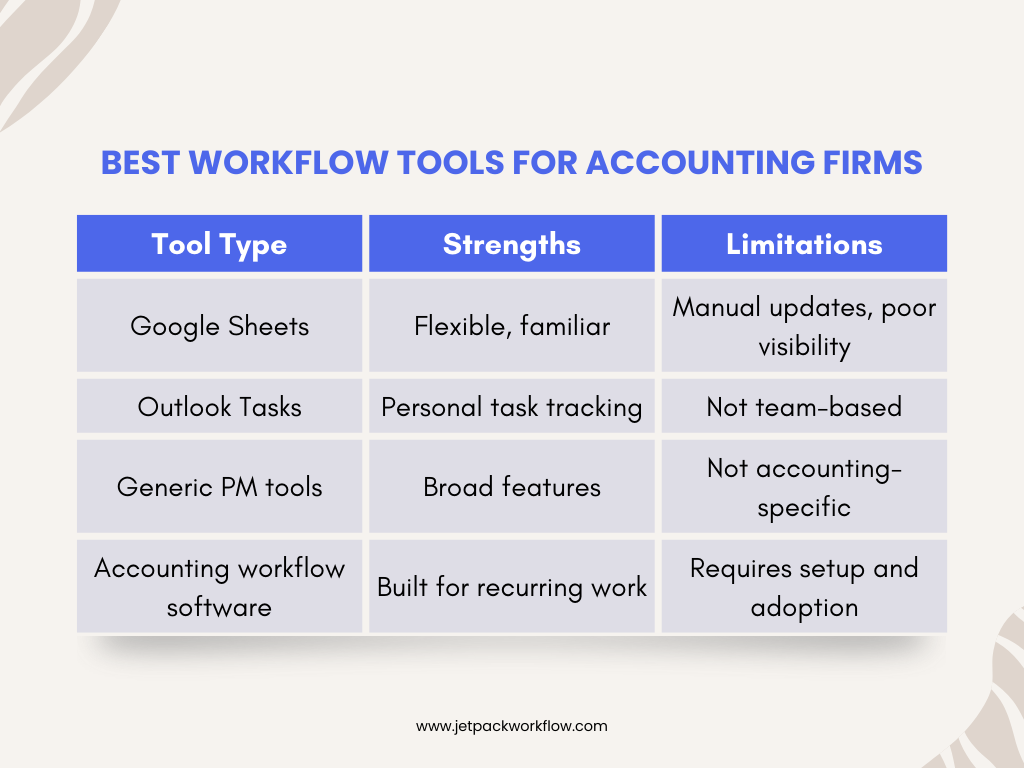
Accounting-specific workflow software is designed for recurring deadlines, client-level customization, and team accountability.
When should firms adopt workflow software?
Most firms adopt workflow software when:
-
Client volume increases
-
Team size grows beyond 3 to 5 people
-
Work is missed or delayed
-
Managers feel reactive instead of in control
-
Remote work becomes permanent
Many firms start with one user during a trial, build templates quietly, and roll out to the team after peak season.
Conclusion
Accounting firms replace spreadsheets and disconnected tools when manual coordination becomes a liability.
A centralized workflow system provides:
-
Operational clarity
-
Consistent execution
-
Real-time visibility
-
Scalable growth
For firms managing recurring client work, workflow software is not an efficiency upgrade. It is an operational foundation.
Frequently Asked Questions
Can workflow software replace Google Sheets and Outlook?
Yes. Workflow software centralizes tasks, deadlines, and visibility so spreadsheets and personal task lists are no longer needed.
Is workflow software only for large accounting firms?
No. Small firms benefit early by standardizing processes before complexity increases.
Can workflows be customized per client?
Yes. Firms can customize tasks and notes for individual clients without breaking standardized templates.
How does workflow software handle recurring deadlines?
Recurring projects are scheduled automatically with due dates that adjust based on client timelines.
Does workflow software support remote staff?
Yes. Cloud-based systems provide equal access for remote and in-office team members.
Can firms start with one user?
Yes. Many firms start solo, then expand to the full team later.
Does workflow software replace chat tools?
Partially. Workflow comments replace task-related messages, but not full conversations.
Related Articles
- The First 100 Days After an Acquisition: Ashley Rhoden’s Integration Framework
- Questions Every Firm Leader Should Ask Before Taking Private Equity: Jennifer Wilson’s Guide
- How to Finance Accounting Firm Acquisitions: SBA Insights from Sarah Sharp and Shannon Hay
- I Sold My Accounting Firm: A Panel Discussion on the Process and Lessons
- Inside the Minds of Firm Buyers: Lessons from Accounting M and A Leaders
- The Future of Accounting Firms in an AI Driven World with Ryan Lazanis
- How Coaching Transforms Accounting Leaders: Lessons from Douglas Slaybaugh
- What is CAS Accounting? Services, Benefits and Growth
- How Tailor Hartman Took His Accounting Firm to 200K in Year 1
- Why Outsourcing plus Workflow Software is the Future of Accounting Firms
- AI Tools That Help Accounting Firms Scale Faster
Build a Scalable Workflow for Your Accounting Firm
Explore how modern accounting workflow software works in practice by booking a demo or starting a free trial to map your processes into a scalable system.
Share this article