How Accounting Firms Track Recurring Deadlines Without Losing Visibility

Accounting firms do not miss deadlines because they lack effort. They miss deadlines because recurring work is spread across spreadsheets, inboxes, and people’s heads. This article breaks down how firms actually solve that problem, based on a real workflow software demo call with accounting, compliance, and onboarding leaders.
The insights below come directly from a live evaluation conversation, not a marketing summary. Every challenge and question reflects how buyers think when recurring deadlines start slipping.
Key Takeaways
-
Recurring deadlines break down when work lives in memory instead of a system
-
Onboarding and compliance are usually the first workflows to fail at scale
-
Visibility problems show up before firms realize they have a process problem
-
Client-specific nuance matters more than generic task lists
-
The right workflow system reduces dependency on individuals, not just tools
Introduction
Accounting firms track hundreds of recurring deadlines every month, yet most still rely on spreadsheets, email, and manual follow-ups to keep work moving. That approach works until it does not.
This article is based on a real demo call with a growing professional services firm evaluating workflow software to manage onboarding, compliance, and recurring client work without relying on individual memory.
Real Sales Call Context
The demo involved multiple stakeholders across onboarding, compliance, and operations. The firm was growing, client volume was increasing, and recurring work was becoming harder to track consistently.
The trigger was not curiosity about new software. It was operational risk.
As Ryan Visniski explained during the call:
“There’s just a recurring series of tasks that come up every quarter, every year. Some things, it’s okay if they slip, but many of them just need to be done on a repeated basis.”
The concern was not just deadlines. It was what happens when knowledge lives with one person.
“Especially if I get hit by a truck and someone else has to try to fill in for me, that would be huge.”
What breaks first when recurring work is tracked manually?
Recurring work does not usually fail all at once. It fails quietly.
During the call, onboarding surfaced as an early pressure point. Shane Crea described the problem directly:
“Workflow, and making sure items are assigned, and don’t slip. Those are kind of our main problems to solve.”
Manual systems rely on people remembering what needs to happen next. That works until workloads increase or someone is unavailable.
Once tasks start slipping, teams compensate by sending more emails, holding more meetings, and checking spreadsheets more often. None of that fixes the underlying visibility issue.
Why do recurring deadlines create more risk than one-off projects?
One-off projects are visible. Recurring deadlines fade into the background.
Compliance work was a clear example in this conversation. Tasks repeat on predictable schedules, but because they feel routine, they are often tracked informally.
As Ryan Visniski explained:
“Many of them just need to be done on a repeated basis.”
When recurring work is not recreated automatically, firms rely on reminders, calendars, or habits. That introduces risk, especially when someone is out or overloaded.
How do firms define visibility in real terms?
Visibility is not about dashboards for the sake of dashboards. It is about answering basic questions without chasing people.
The demo leader, Beatty, framed this from a management perspective:
“Instead of trying to chase down each individual shareholder and ask them what’s going on.”
True visibility means being able to see:
-
What work exists for each client
-
Where that work is stuck
-
Who owns it
-
Whether it has been touched recently
Without this, leaders operate reactively instead of proactively.
How do templates reduce reinvention without removing flexibility?
A common concern raised in the call was whether templates could handle real-world nuance.
Accounting firms rarely deliver identical work across clients. Compliance requirements vary. Onboarding steps change. Advisory services evolve.
Templates were positioned as a foundation, not a constraint.
As Beatty explained:
“Templates are living, growing, breathing with you. You can change whatever you would like, and it will automatically update all of the clients that are associated with that in the future.”
This reduces reinvention while still allowing change as processes improve.
How do cascading due dates change how teams work?
Cascading due dates were one of the most practical moments in the demo.
Instead of setting fixed dates for every task, deadlines adjust automatically based on each client’s due date.
Beatty gave a concrete example:
“If you have a client that’s due monthly on the 30th, this first task would pop up 10 days before. If we had somebody the 15th, it would be the 5th.”
This shifts teams from reacting at the deadline to working ahead of it. Work appears when it needs to start, not when it is already late.
How do firms handle client-specific nuances without breaking workflows?
Client nuance was raised explicitly as a concern.
Shane Crea asked:
“We have projects that run the same, but there’s nuances within the project. Can you do a modification just for that one client?”
This is a common scaling challenge. Firms either over-standardize and force workarounds, or over-customize and lose consistency.
The response clarified how client-level customization works.
Beatty confirmed:
“Anything that you modify in this client’s task list will change into the future for that client.”
This allows firms to preserve standards while respecting client-specific needs.
How does workload visibility improve accountability?
Visibility is not just about deadlines. It is also about capacity.
During the demo, capacity planning was shown as a way to prevent overload and missed work.
Without this visibility, work is assigned based on assumptions. With it, firms can rebalance before deadlines are at risk.
How does internal communication reduce email overload?
Email volume was another pain point raised early in the call.
Steven Hershman described the issue:
“As we’re growing, the volume of clients that we have, and the volume of back-and-forth email communications… we’re reactive to it.”
By tying comments and updates directly to tasks and projects, teams reduce the need for internal email chasing. Context stays with the work instead of being buried in inboxes.
How do firms compare workflow approaches in practice?
Based on real buyer conversations, firms usually evaluate three options.
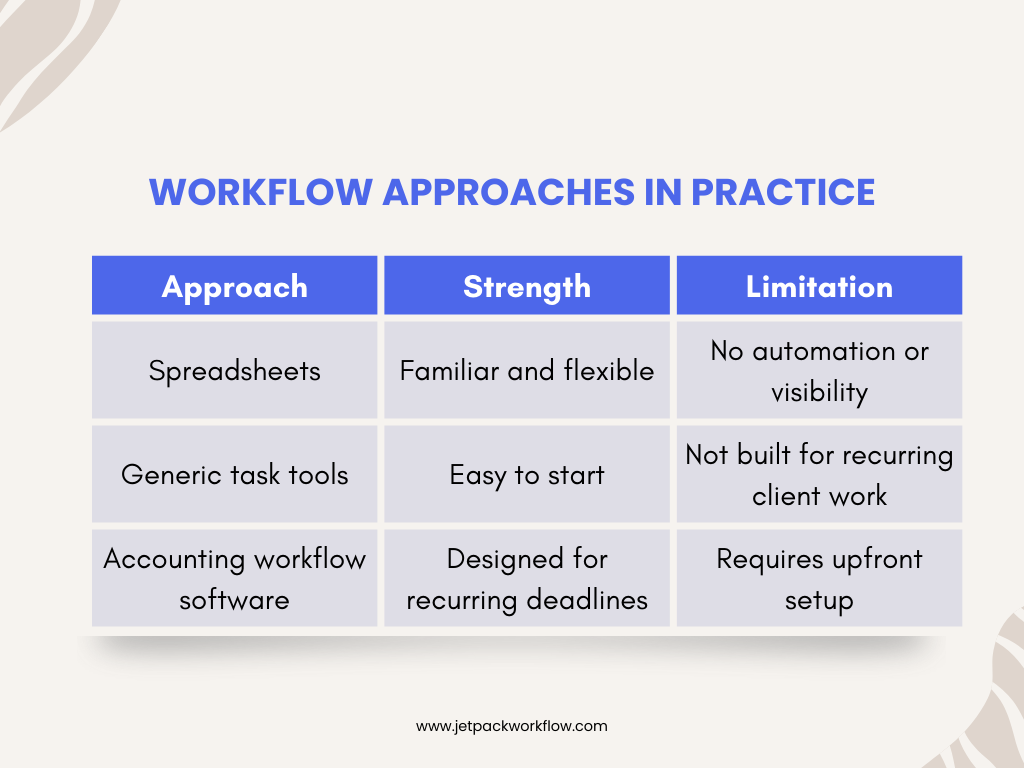
The tradeoff is clear. Spreadsheets fail quietly. Generic tools fail at scale. Purpose-built systems require setup but reduce long-term risk.
Why onboarding exposes workflow gaps first
Across many sales calls, onboarding is often where workflow problems surface first.
New clients introduce urgency, incomplete information, and multiple handoffs. Without a structured workflow, teams rely on memory and email to keep things moving.
That is why onboarding is often the starting point for workflow change.
Original Insight: Visibility matters more than automation
Automation is attractive, but visibility drives behavior.
Firms gain the most value when leaders can see what is happening without interrupting the team. Automation supports that outcome, but visibility is what changes how firms operate day to day.
Conclusion
Recurring deadlines do not fail because teams are careless. They fail because systems are informal.
Firms that maintain visibility as they grow move work out of memory and into a shared workflow. They standardize what they can, customize where it matters, and make ownership visible.
If you want to see how recurring deadlines can be tracked without spreadsheets or inbox chasing, the next step is to explore a real workflow demo or trial using your actual client work.
Frequently Asked Questions
How do accounting firms track recurring deadlines?
They use systems that automatically recreate work based on client-specific schedules instead of manual reminders.
What causes recurring tasks to slip?
Tasks slip when ownership is unclear and progress is not visible in a shared system.
Can workflows be customized per client?
Yes. Client-level changes allow nuance without breaking standardized processes.
How do firms handle absences without missing work?
By documenting steps and context directly in the workflow so others can step in.
Is workflow software only for large firms?
No. Smaller firms often feel the pain sooner because fewer people carry more responsibility.
Related Articles
- The First 100 Days After an Acquisition: Ashley Rhoden’s Integration Framework
- Questions Every Firm Leader Should Ask Before Taking Private Equity: Jennifer Wilson’s Guide
- How to Finance Accounting Firm Acquisitions: SBA Insights from Sarah Sharp and Shannon Hay
- I Sold My Accounting Firm: A Panel Discussion on the Process and Lessons
- Inside the Minds of Firm Buyers: Lessons from Accounting M and A Leaders
- The Future of Accounting Firms in an AI Driven World with Ryan Lazanis
- How Coaching Transforms Accounting Leaders: Lessons from Douglas Slaybaugh
- What is CAS Accounting? Services, Benefits and Growth
- How Tailor Hartman Took His Accounting Firm to 200K in Year 1
- Why Outsourcing plus Workflow Software is the Future of Accounting Firms
- AI Tools That Help Accounting Firms Scale Faster
Get Visibility Into Every Client Deadline
Stop relying on memory, email, and follow-ups to manage recurring work. Explore how accounting workflow software helps teams track deadlines, capacity, and accountability in one system.
Share this article