Looking for the best Client Hub alternatives for your accounting or bookkeeping firm? Client Hub offers client communication and practice management features, but it may not be the right fit for every firm’s workflow, budget, or operational needs.
Some firms need a dedicated client portal for collecting documents and communicating with clients. Others need stronger recurring task management, deadline tracking, and visibility into their team’s workload.
In this guide, we compare five Client Hub competitors, including Jetpack Workflow, Financial Cents, Karbon, TaxDome, and Uku, to help you find the right accounting practice management software for your firm.
Key Takeaways
-
Jetpack Workflow focuses on recurring accounting tasks, deadline tracking, and workflow standardization across clients.
-
Financial Cents combines accounting workflow management with client communication and collaboration tools.
-
Karbon is designed for accounting teams that need email management, task coordination, and internal collaboration.
-
TaxDome offers practice management features including client portals, document management, billing, and workflow automation.
-
Uku combines recurring task management, time tracking, workload monitoring, and billing.
Why Accounting Firms Look for Client Hub Alternatives
Client Hub helps accounting and bookkeeping firms manage client communication, collect documents, and organize work in one platform. However, not every firm needs the same combination of features.
For some firms, the biggest challenge is getting clients to respond to document requests. For others, it is keeping monthly bookkeeping, payroll, tax preparation, and recurring client work on schedule.
Common reasons firms explore alternatives to Client Hub include:
- Recurring workflow management: Managing monthly, quarterly, and annual accounting tasks without manually recreating them.
- Deadline tracking: Monitoring upcoming deadlines, overdue work, and outstanding assignments.
- Team accountability: Knowing who is responsible for each task and whether work is progressing.
- Workflow standardization: Creating consistent processes across bookkeeping, payroll, tax, and client onboarding.
- Software complexity: Choosing a focused workflow platform instead of paying for features the firm may not need.
Quick Comparison: 5 Best Client Hub Alternatives
| Software | Best For | Key Strength |
|---|---|---|
| 1. Jetpack Workflow | Recurring accounting workflows | Deadline tracking, recurring tasks, and workflow standardization |
| 2. Financial Cents | Small accounting firms | Workflow management and client collaboration |
| 3. Karbon | Growing accounting teams | Email-centric collaboration and work management |
| 4. TaxDome | All-in-one practice management | Client portal, documents, billing, and workflows |
| 5. Uku | Bookkeeping firms tracking workload | Recurring tasks, time tracking, and billing |
1. Jetpack Workflow: Best for Recurring Accounting Workflows and Deadline Management
Jetpack Workflow is accounting workflow management software designed for accountants, bookkeepers, CPA firms, and tax professionals who need a reliable way to manage recurring client work.
Unlike platforms that place client communication at the center of practice management, Jetpack Workflow focuses on organizing internal operations, standardizing accounting processes, and keeping deadlines and responsibilities visible across the firm.
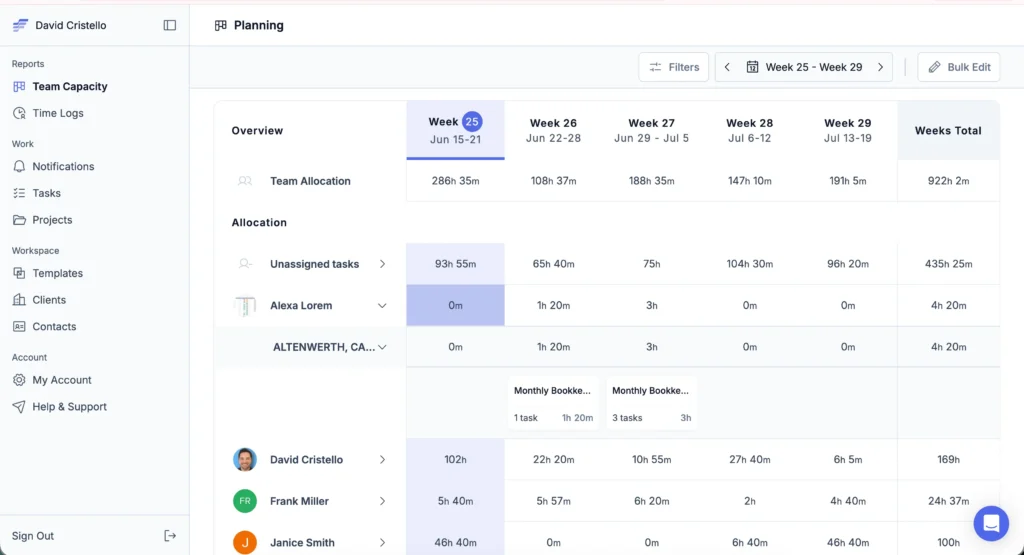
Its biggest advantage is recurring workflow management. Instead of manually recreating monthly bookkeeping checklists, payroll tasks, or tax preparation processes, firms can build repeatable workflows with assigned responsibilities and deadlines.
Key Features
- Recurring workflow automation: Schedule repeating work for bookkeeping, payroll, tax preparation, and other accounting services.
- Firm-wide workflow updates: Update templates and apply changes to associated projects that have not started.
- Deadline tracking: Monitor upcoming, overdue, and completed tasks.
- Team workload visibility: Track assignments and identify outstanding work.
- Accounting workflow templates: Access 32+ templates for common accounting processes.
- Centralized client work: Organize jobs, tasks, and responsibilities in one workspace.
Why Choose Jetpack Workflow Over Client Hub?
The main difference between Jetpack Workflow and Client Hub is what each platform prioritizes.
Client Hub emphasizes client communication, document collection, and collaborative workflows. Jetpack Workflow concentrates on the internal processes accounting firms need to deliver recurring work consistently.
For example, imagine your bookkeeping firm manages monthly reconciliations, financial reporting, and payroll for 75 clients. With Jetpack Workflow, you can create recurring workflows, assign responsibilities, monitor deadlines, and update standardized processes without manually rebuilding every future project.
This makes Jetpack Workflow particularly useful for firms struggling with missed deadlines, inconsistent procedures, and limited visibility into employee workloads.
Pros
- Purpose-built for accounting and bookkeeping firms
- Strong recurring task and deadline management
- Workflow standardization across multiple clients
- Firm-wide updates to future recurring work
- Pre-built accounting workflow templates
- Clear visibility into team responsibilities
Cons
- Not an all-in-one client portal and billing platform
- Firms needing extensive client messaging or document collection may require complementary software
Pricing: Jetpack Workflow offers Starter and Premium plans. Visit the official pricing page for current subscription details.
Best for: Accounting and bookkeeping firms managing recurring client work that need stronger deadline control, workflow consistency, and team accountability.
Our verdict: Jetpack Workflow is our #1 Client Hub alternative for firms whose primary challenge is recurring workflow management rather than client communication.
Stop Managing Recurring Accounting Tasks Manually
Keep client deadlines, recurring workflows, and team assignments organized with Jetpack Workflow.
2. Financial Cents: Best for Small Firms Wanting Workflow and Client Collaboration
Financial Cents is accounting practice management software that combines workflow management, client requests, time tracking, and billing capabilities.
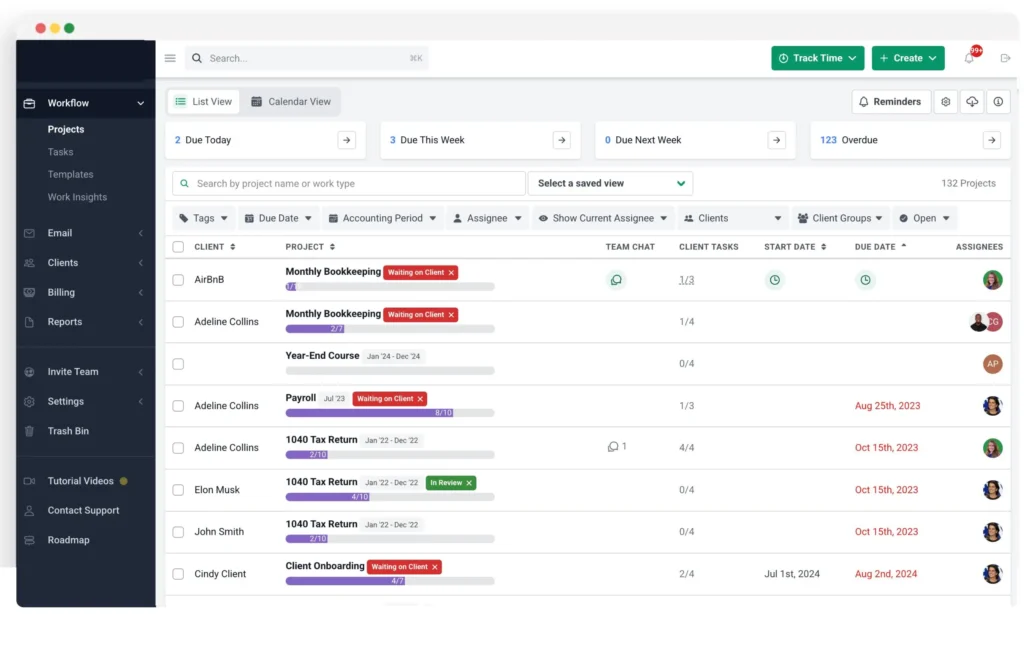
It is a useful Client Hub alternative for small accounting and bookkeeping firms that want to manage internal tasks while maintaining a client-facing communication process.
Key Features
- Recurring tasks and workflow templates
- Client requests and automated reminders
- Time tracking and billing
- Workflow dashboards
- Client collaboration tools
Pros
- Combines internal workflows with client-facing tools
- Accounting-specific workflow templates
- Suitable for solo practitioners and small teams
- Supports client requests and document collection
Cons
- Some advanced features may require higher-tier plans
- Firms should review plan limits and contract terms before committing
Best for: Small accounting firms looking for workflow management combined with client collaboration.
3. Karbon: Best for Email-Centric Team Collaboration
Karbon is accounting practice management software designed to coordinate client engagements, team communication, and internal workflows.
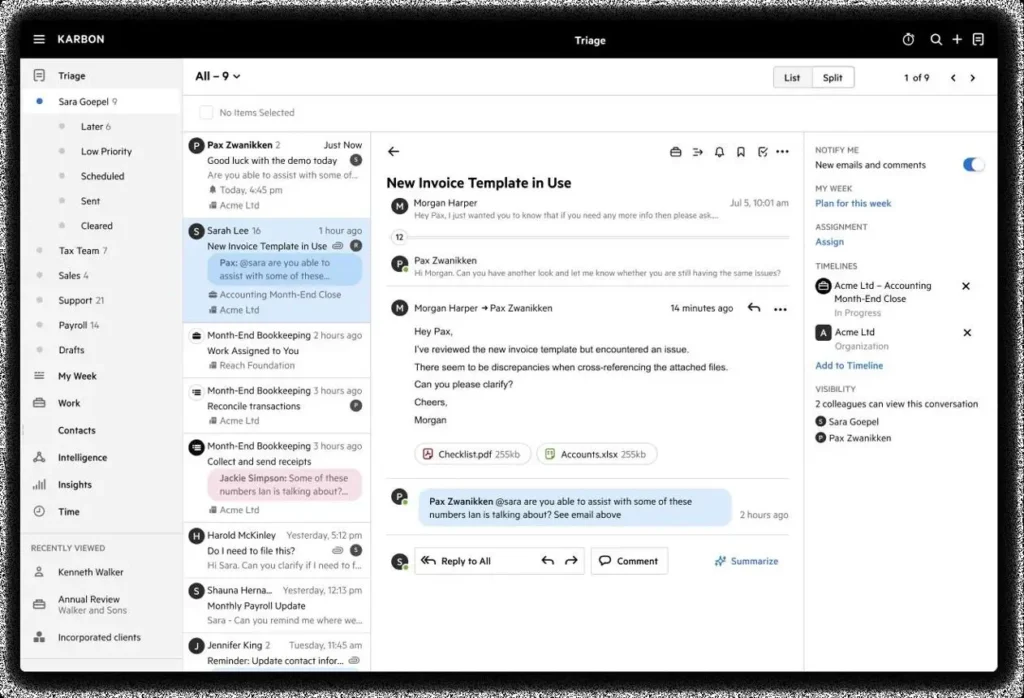
One of its distinguishing features is email integration, allowing firms to manage client conversations alongside work assignments and team collaboration.
Key Features
- Shared email and communication management
- Workflow automation and task assignments
- Client work tracking
- Team collaboration tools
- Workload and performance reporting
Pros
- Strong email and team collaboration features
- Suitable for multi-person accounting teams
- Supports complex workflows and client engagements
- Centralized communication visibility
Cons
- Can require more onboarding and configuration
- May offer more functionality than smaller firms need for basic recurring workflows
Best for: Growing accounting firms that want email communication closely connected to practice management.
4. TaxDome: Best for All-in-One Accounting Practice Management
TaxDome combines workflow management, client communication, document management, billing, and electronic signatures in one platform.
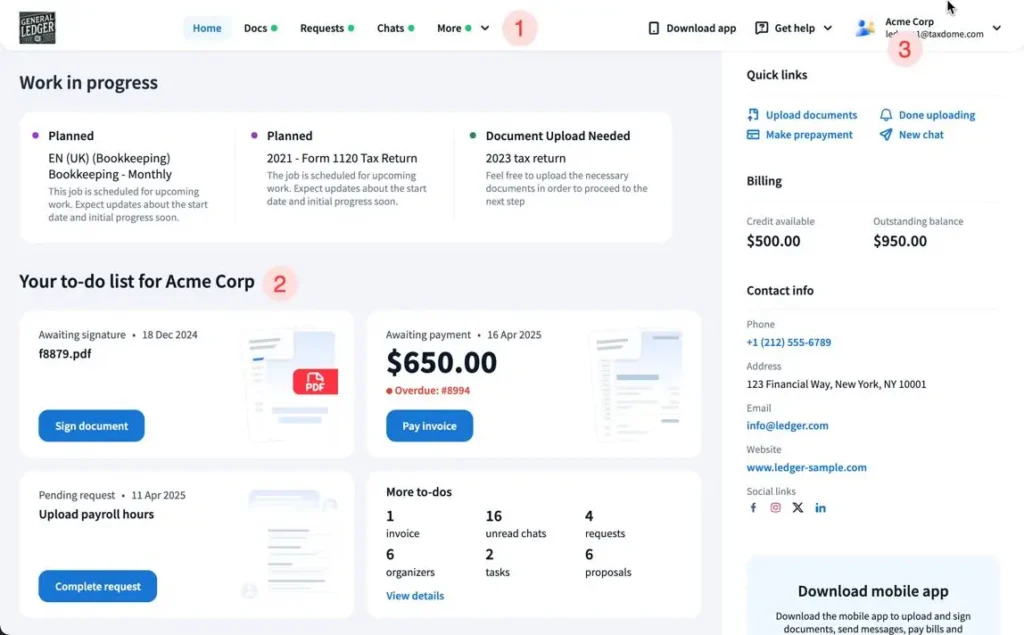
For firms that want to consolidate several client-facing and operational tools, TaxDome offers a broader practice management system than a workflow-focused product.
Key Features
- Client portal and document management
- Workflow pipelines and automation
- Electronic signatures
- Invoicing and payment collection
- Client communication and CRM
Pros
- Broad range of practice management features
- Built-in client portal and e-signatures
- Supports billing and payment collection
- Useful for tax and accounting practices
Cons
- More functionality to configure and learn
- Subscription commitments may not suit every firm
Best for: Accounting and tax firms wanting a single platform for workflows, client documents, and payments.
5. Uku: Best for Workload Tracking and Automated Billing
Uku is accounting practice management software that helps firms manage recurring tasks, track employee time, monitor workloads, and automate billing.
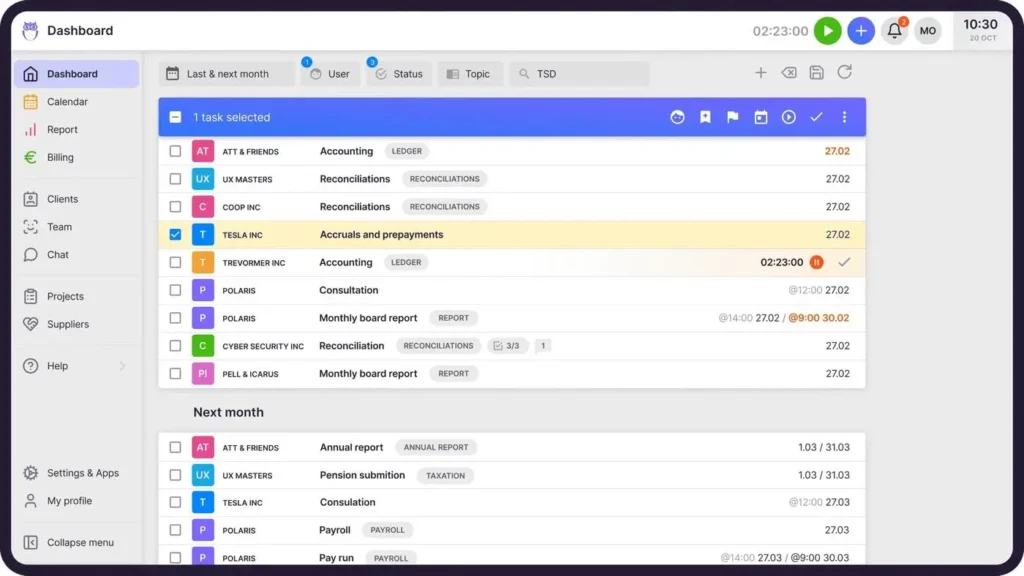
Its combination of recurring workflows and time-based billing makes it an option for bookkeeping and accounting firms that want greater visibility into completed work and billable activity.
Key Features
- Recurring accounting tasks and templates
- Time tracking
- Automated billing and invoicing
- Client management
- Workload and profitability reporting
- Client portal capabilities
Pros
- Combines workflow and billing management
- Useful for tracking billable work
- Supports recurring accounting processes
- Suitable for firms operating internationally
Cons
- Some reporting and automation features depend on the subscription plan
- Firms focused only on deadline management may not need the broader billing functionality
Best for: Accounting firms looking to connect recurring work, employee time tracking, and billing.
Client Hub vs. Jetpack Workflow: Key Differences
Both Client Hub and Jetpack Workflow help accounting firms manage client work, but they serve different operational priorities. Here is how their core capabilities compare.
| Feature | Jetpack Workflow | Client Hub |
|---|---|---|
| Recurring accounting tasks | Yes | Yes |
| Workflow templates | Yes | Yes |
| Deadline tracking | Yes | Yes |
| Team task assignments | Yes | Yes |
| Firm-wide template updates | Yes, for projects not yet started | Confirm current functionality |
| Native client portal | No | Yes |
| Client messaging | Internal collaboration focus | Yes |
| Document collection | Not a native client portal | Yes |
| Time tracking | Premium plan | Yes |
| Native invoicing | No | Confirm current functionality |
How Much Does Jetpack Workflow Cost?
Jetpack Workflow offers Starter and Premium subscription plans for accounting firms, along with enterprise options for larger organizations.
- Starter: Designed for firms needing recurring workflows, templates, and project management.
- Premium: Adds capabilities such as time tracking, budget-versus-actual reporting, and capacity management.
- Enterprise: Custom options for larger accounting teams.
Visit the Jetpack Workflow pricing page to compare current rates, billing options, and trial availability.
How to Choose the Right Client Hub Alternative
Before switching accounting practice management software, identify the operational problem your firm needs to solve first.
If your team struggles with missed deadlines, recurring tasks, and inconsistent procedures, prioritize workflow management software. If your biggest challenge is collecting documents or communicating with clients, a client portal may be more important.
Consider these questions before making a decision:
- Does your firm need recurring workflows across multiple clients?
- Do you need a client-facing portal or mainly internal task management?
- Can you standardize and update processes without manually editing every client project?
- Does the software provide enough visibility into team assignments and deadlines?
- Will your existing accounting and billing tools remain part of your software stack?
For many small and midsize accounting firms, choosing a focused workflow tool alongside existing accounting software can be more practical than replacing every system at once.
Frequently Asked Questions About Client Hub Alternatives
What is the best Client Hub alternative for accountants?
Jetpack Workflow is our top recommendation for accounting firms prioritizing recurring task management, deadline tracking, and standardized workflows. Financial Cents, Karbon, TaxDome, and Uku are alternatives for firms requiring broader practice management capabilities.
Is Jetpack Workflow better than Client Hub?
It depends on your firm’s needs. Jetpack Workflow is a strong choice for managing recurring accounting work, deadlines, and internal operations. Client Hub may be more suitable when client communication, document collection, and a client-facing portal are central requirements.
Does Jetpack Workflow have a client portal?
No. Jetpack Workflow focuses on internal workflow management, client records, task assignments, and deadline tracking. Firms needing a dedicated client portal can use complementary software.
Can Jetpack Workflow manage recurring bookkeeping tasks?
Yes. Accounting firms can create templates for monthly bookkeeping, payroll, tax preparation, and other services, then assign them to clients with recurring schedules.
Can Jetpack Workflow update multiple client workflows at once?
Yes. Jetpack Workflow supports bulk changes from templates to associated projects that have not started. This helps firms maintain consistent processes without editing each future project individually.
Which Client Hub alternative is best for small bookkeeping firms?
Jetpack Workflow is a strong fit for bookkeeping firms focused on recurring client work and deadlines. Financial Cents is worth considering for firms that also need client-facing collaboration, while Uku may suit firms wanting integrated billing and time tracking.
Which Client Hub Alternative Should You Choose?
Choosing the right Client Hub alternative depends on your firm’s priorities. Some accounting firms need better client communication and document management, while others are looking for more efficient workflows, deadline tracking, and team collaboration.
Each platform offers different strengths. Financial Cents and Karbon provide a mix of workflow management and collaboration tools, while TaxDome and Uku offer broader practice management features.
For firms primarily focused on managing recurring tasks, standardizing processes, and keeping client work on schedule, Jetpack Workflow is worth considering. Its workflow-focused approach may be particularly useful for accounting and bookkeeping firms that already have client communication tools in place but need a better way to organize their internal operations.
Ready to Take Control of Your Accounting Workflows?
Manage recurring tasks, track client deadlines, and keep your accounting team organized with Jetpack Workflow.