Jetpack Workflow and Airtable can both help accounting firms organize projects, tasks, client information, and deadlines. However, they approach workflow management in very different ways.
Jetpack Workflow is accounting workflow software built specifically for accountants, bookkeepers, tax professionals, payroll providers, and CAS teams. Airtable is a flexible, general-purpose platform businesses can use to build custom databases, interfaces, automations, and internal applications.
When comparing Airtable vs Jetpack Workflow, the main question is whether your firm wants to build and maintain its own workflow system or use a platform already structured around recurring accounting work.
TL;DR: Jetpack Workflow vs Airtable
Jetpack Workflow is generally better for accounting firms that need to standardize recurring client work, assign responsibilities, track deadlines, manage future projects, and see what the entire team is working on.
Airtable is better for firms that want maximum customization and have someone available to design, test, document, and maintain a custom operating system.
For most accounting and bookkeeping firms managing monthly, quarterly, and annual client services, Jetpack Workflow provides the more purpose-built option. Airtable may be a better fit when the firm needs a highly customized database or wants to manage processes extending well beyond accounting workflow management.
Key Takeaways
- Jetpack Workflow is designed specifically for accounting and bookkeeping firms.
- Airtable is a general no-code database and application-building platform.
- Jetpack Workflow provides native recurring projects, accounting workflow templates, client records, deadline tracking, and team visibility.
- Airtable offers greater freedom to build custom databases, interfaces, reports, forms, and automations.
- Jetpack Workflow requires less configuration for recurring accounting work.
- Airtable may have a lower subscription price, but firms should also consider setup, maintenance, troubleshooting, and training costs.
- Jetpack Workflow allows template changes to update associated projects that have not started.
- Airtable is the stronger option for highly customized internal applications and broader business use cases.
- Neither platform replaces accounting software such as QuickBooks or Xero.
Jetpack Workflow vs Airtable at a Glance
| Feature | Jetpack Workflow | Airtable |
|---|---|---|
| Primary purpose | Accounting workflow management | Custom databases and business applications |
| Best suited for | Accounting, bookkeeping, tax, payroll, and CAS firms | Teams that need maximum flexibility |
| Accounting-specific structure | Built around accounting firm operations | Must be created or customized |
| Recurring client work | Native recurring projects and schedules | Possible through automations and configuration |
| Workflow templates | Customizable accounting workflow templates | General templates and custom bases |
| Client records | Native client and contact records | Built using tables, linked records, and fields |
| Deadline management | Recurring schedules and cascading task deadlines | Custom date fields, formulas, views, and automations |
| Global workflow changes | Template updates can change associated projects that have not started | Depends on the base structure and automation setup |
| Team visibility | Centralized views of assignments, deadlines, progress, and future work | Custom views, interfaces, and reports |
| Capacity management | Included with the Premium plan | Can be built through custom dashboards |
| Time tracking | Included with the Premium plan | Requires configuration or an integration |
| AI capabilities | Focused on workflow structure and automation | Broader native AI and application-building capabilities |
| Setup requirements | Accounting-focused configuration and training | Requires designing and maintaining the system |
| Free option | 14-day free trial with no credit card required | Free plan available |
| Annual starting price | $40 per user per month (unlimited projects and clients) | $20 per seat per month for the Team plan |
Pricing is based on published annual billing rates as of July 2026 and may change.
What Is Jetpack Workflow?
Jetpack Workflow is workflow management software designed for accounting and bookkeeping firms. It helps teams standardize recurring work, assign responsibilities, track deadlines, plan future projects, and monitor progress across the firm.
Accounting firms can use Jetpack Workflow to manage services such as:
- Monthly bookkeeping
- Client onboarding
- Payroll processing
- Accounts payable and receivable
- Month-end close
- Tax preparation
- Tax planning
- Financial statement preparation
- Client advisory services
- Annual compliance work
Instead of building an accounting workflow system from a blank database, firms begin with a structure based on clients, projects, tasks, templates, due dates, team assignments, and recurring service schedules.
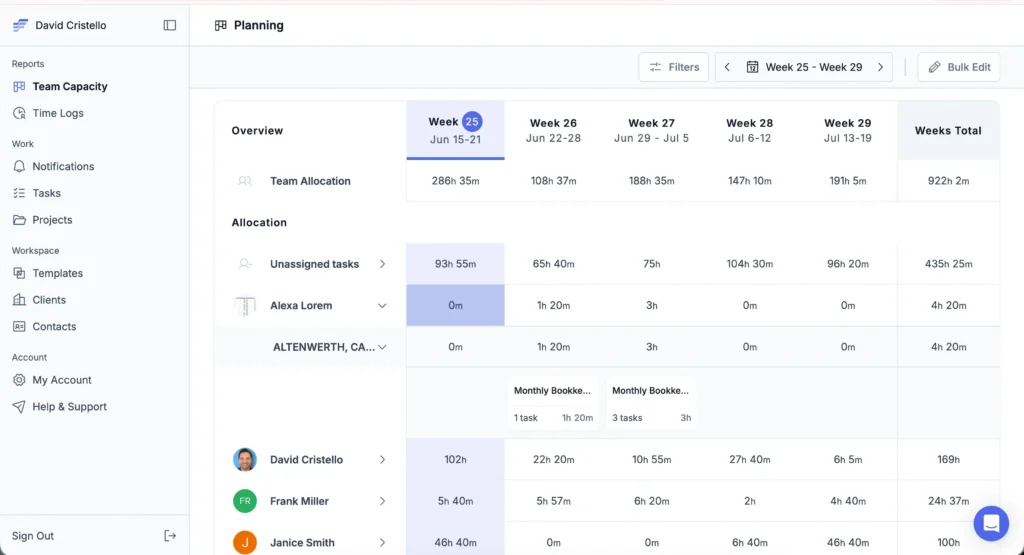
This makes Jetpack Workflow particularly useful for firms struggling with missed deadlines, inconsistent processes, limited team visibility, or too many manual status updates.
What Is Airtable?
Airtable is a no-code application platform built around a relational database. Businesses can use it to organize connected information, create different views, build interfaces, collect data through forms, run automations, and develop internal tools.
An accounting firm could use Airtable to track:
- Clients and contacts
- Bookkeeping engagements
- Tax return statuses
- Document requests
- Employee assignments
- Sales opportunities
- Referral relationships
- Internal projects
- Content calendars
- Firm performance data
Airtable’s main advantage is flexibility. A firm can create a database structure tailored to its exact requirements and connect information across multiple tables.
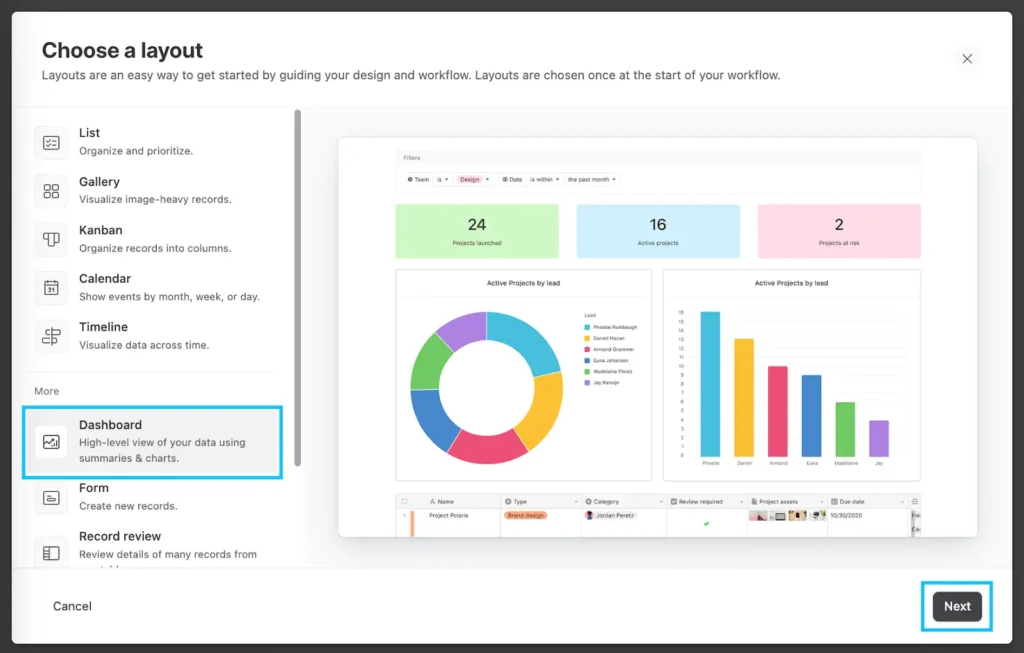
The trade-off is that the firm must decide how the system should work. Fields, relationships, views, permissions, formulas, automations, alerts, and reporting structures must be designed and maintained internally.
What Is the Main Difference Between Jetpack Workflow and Airtable?
The main difference is that Jetpack Workflow provides a workflow system built for accounting firms, while Airtable gives firms the tools to build their own system.
This distinction affects implementation, maintenance, employee adoption, and long-term scalability.
With Jetpack Workflow, firms can add clients, create or customize workflow templates, schedule recurring project series, assign work, and track deadlines inside an established accounting workflow structure.
With Airtable, the firm controls almost every part of the database and user experience. This can be valuable when a firm has unusual requirements or someone who understands how to build and maintain Airtable bases, linked records, interfaces, formulas, and automations.
The decision is not simply about which platform has more features. It is about how much technical and operational responsibility the firm wants to manage internally.
7 Key Differences Between Jetpack Workflow and Airtable
1. Accounting-Specific Workflow Management
Jetpack Workflow is designed around the way accounting firms deliver recurring services. Clients, projects, task assignments, due dates, workflow templates, and recurring schedules are central parts of the platform.
Airtable supports businesses across many industries. It can be configured for accounting processes, but the firm must create those processes or adapt a more general template.
Jetpack Workflow is usually the better fit for firms that want accounting workflow software without having to build an internal application from the ground up.
Airtable may be more appropriate when an accounting firm has highly unusual processes that do not fit within a specialized workflow platform.
2. Recurring Client Work
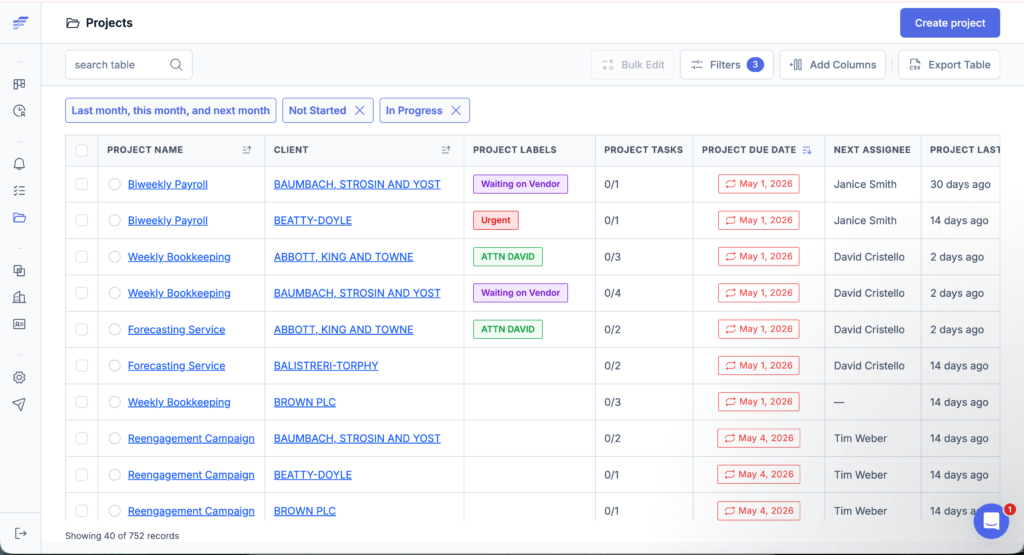
Recurring work is central to accounting firm operations. Monthly bookkeeping, payroll, financial reporting, tax planning, and compliance work must be completed on predictable schedules.
Jetpack Workflow lets firms create recurring project series for daily, weekly, monthly, quarterly, annual, or custom schedules. The recurring structure is part of the platform.
Airtable can also manage recurring work. Firms can use scheduled automations, date fields, formulas, linked records, and scripts to create future records or update existing ones.
However, the Airtable system must be configured to answer questions such as:
- When should each recurring record be created?
- How should dates move forward?
- How are client-specific exceptions handled?
- What happens when an automation fails?
- Who checks whether every expected project was created?
- How are completed periods separated from future work?
For a firm managing hundreds of repeating client engagements, native recurring workflow functionality can reduce administrative work and configuration requirements.
3. Workflow Templates and Firm-Wide Process Changes
Both platforms can support repeatable processes, but they manage templates differently.
Jetpack Workflow allows firms to build reusable project templates and associate them with client work. When a template changes, the corresponding updates can be applied to associated projects that have not started.
For example, suppose a bookkeeping firm adds a new quality-control step to its monthly close process. The firm can update the workflow template instead of manually editing every future client project.
This is particularly useful when a growing firm regularly improves its procedures, compliance checks, or review requirements.
Airtable can support a similar system through linked tables, record templates, automations, and carefully designed relationships. However, the result depends on how the base was originally structured.
If future projects were created as separate records without a reliable connection to a central template, process changes may require manual updates or additional automation.
4. Deadline and Due-Date Management
Jetpack Workflow is built to help accounting firms plan work around recurring client deadlines.
Firms can schedule individual tasks based on the final project due date. If one client’s monthly reporting package is due on the 15th and another client’s is due on the 30th, the same workflow can schedule preparatory tasks according to each client’s timeline.
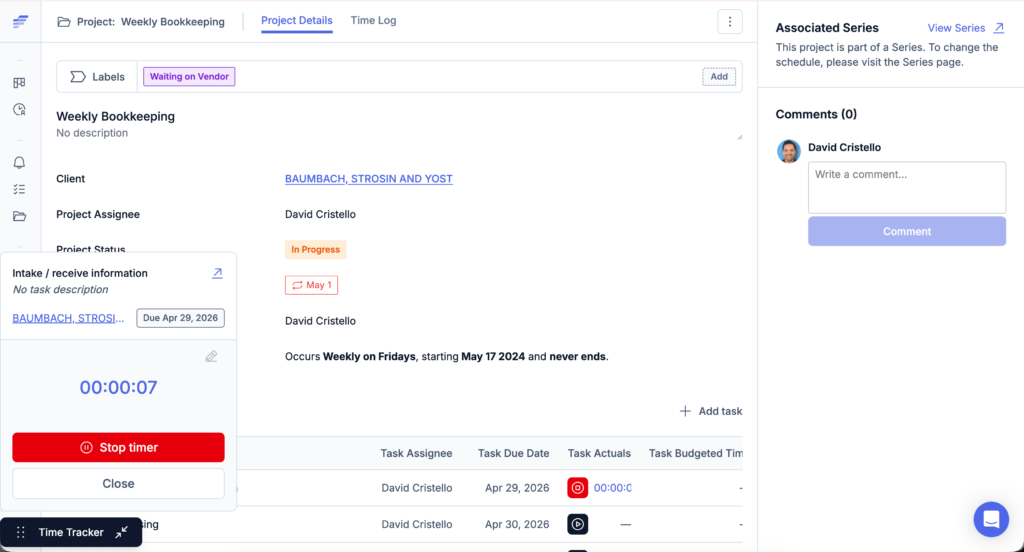
This helps teams begin work before a deadline becomes urgent.
Airtable can track deadlines using:
- Date fields
- Calendar views
- Timeline views
- Formulas
- Conditional formatting
- Notifications
- Custom interfaces
- Scheduled automations
Airtable offers considerable flexibility, but the firm must define the deadline logic and confirm that formulas and automations continue working correctly.
5. Customization and Flexibility
Airtable provides broader customization than Jetpack Workflow.
Firms can use Airtable to build:
- Relational client databases
- Custom intake forms
- Sales and marketing trackers
- Internal applications
- Approval processes
- Custom management interfaces
- AI-supported workflows
- Cross-departmental systems
- Highly specialized reports and dashboards
Jetpack Workflow provides customization within an accounting workflow framework. Firms can customize:
- Workflow templates
- Project tasks
- Checklists
- Assignees
- Due dates
- Recurring schedules
- Client information
- Project structures
- Team views
Airtable offers a wider canvas. Jetpack Workflow provides clearer operational boundaries, which can make setup, training, and daily use easier for accounting teams.
6. Reporting, Workload, and Team Visibility
Airtable lets firms create custom interfaces, views, and reports based on the information stored in the system. This is useful when a firm has someone who can build the right data model and turn it into meaningful dashboards.
Jetpack Workflow focuses on the operational questions accounting firms regularly need to answer:
- What work is due today?
- Which projects are overdue?
- What should each employee work on next?
- How far has each client project progressed?
- What work is scheduled for the coming weeks?
- Which tasks remain unassigned?
- Which team members are reaching capacity?
- How much time is being spent on particular services?
- How does budgeted time compare with actual time?
Jetpack Workflow Premium includes time tracking, budget-versus-actual reporting, and capacity management reporting.
Airtable can be configured to answer similar questions, but the firm must determine which data to collect and how the reporting interface should work.
7. Setup and Ongoing Maintenance
Jetpack Workflow still requires firms to define their services, document their processes, create templates, and assign responsibilities. However, its underlying structure is already designed for accounting workflow management.
A firm building its primary workflow system in Airtable may need to create and maintain:
- Client and engagement tables
- Linked database relationships
- Workflow template logic
- Recurring record automations
- Due-date formulas
- Employee views
- Management dashboards
- User permissions
- Error monitoring
- Internal documentation
- Employee training materials
Airtable can appear easier at the beginning because a team can quickly create a table and enter data. The real complexity often becomes apparent when the firm tries to turn that table into a reliable, firm-wide operating system.
Before choosing Airtable, firms should determine who will own the system after it is launched. Without clear ownership, automations can break, fields can become inconsistent, and employees may begin using separate spreadsheets or workarounds.
Jetpack Workflow vs Airtable Pricing
Airtable has the lower published starting price and also offers a free plan.
Airtable Pricing
Airtable’s published annual pricing includes:
- Free: $0
- Team: $20 per user per month, billed annually
- Business: $45 per user per month, billed annually
- Enterprise Scale: Custom pricing
Airtable’s self-serve plans are billed by workspace. Billing can also depend on each collaborator’s permission level, so firms should review the current billing rules when estimating the total cost.
Jetpack Workflow Pricing
Jetpack Workflow offers two primary plans:
- Starter: $40 per user per month, billed annually
- Premium: $50 per user per month, billed annually
Starter includes:
- Unlimited projects and clients
- Unlimited workflow templates
- Customizable automation
- Team collaboration and change management
- Live chat and email support
- Training
Premium includes everything in Starter, plus:
- Time tracking
- Budget-versus-actual reporting
- Capacity management reporting
Jetpack Workflow also offers a 14-day free trial without requiring a credit card.
Which Platform Costs Less?
Airtable has the lower starting subscription price. However, subscription fees are only one part of the total cost.
Accounting firms should also consider:
- Initial system design
- Automation setup
- Workflow template development
- Testing and troubleshooting
- Employee training
- Internal documentation
- Ongoing maintenance
- Automation usage limits
- Time spent correcting inconsistent records
- Dependence on the person who built the system
- Consultant or developer costs
Airtable may remain the less expensive option when the firm has simple requirements or already has internal Airtable expertise.
Jetpack Workflow may provide a lower total operational cost when the alternative requires substantial employee or consultant time to build and maintain an accounting-specific Airtable system.
Is Airtable Good for Accounting Firms?
Yes, Airtable can work for accounting firms, particularly when the firm needs a highly customizable database or internal application.
Airtable may be a good choice when:
- The firm has a dedicated operations or technology lead.
- Existing workflows are highly specialized.
- The firm wants to connect accounting workflows with sales, marketing, recruiting, or other departments.
- The system is mainly used to organize data rather than control recurring deadlines.
- The firm is prepared to maintain formulas, scripts, and automations.
- AI-supported application building is a priority.
- The team already uses Airtable successfully.
- Management needs custom interfaces that cannot be created in specialized workflow software.
The main risk is not Airtable’s functionality. It is operational inconsistency.
Without clear governance, different employees may create their own fields, naming conventions, views, and workarounds. Over time, this can make reporting less reliable and make the system harder for new employees to understand.
When Is Jetpack Workflow Better Than Airtable?
Jetpack Workflow is generally the better option when a firm’s main goal is to manage recurring accounting work consistently.
Consider Jetpack Workflow when your firm needs to:
- Standardize monthly bookkeeping processes
- Track tax and compliance deadlines
- Create recurring client projects
- Assign tasks across preparers and reviewers
- See overdue and upcoming work
- Plan work before deadlines arrive
- Apply process changes across future client projects
- Monitor team workload and capacity
- Onboard employees into documented workflows
- Reduce dependence on spreadsheets and memory
- Implement workflow software without building a custom database
Jetpack Workflow is particularly relevant for firms with one to 50 employees that need better operational control without building their own internal application.
8 Signs Your Accounting Firm Has Outgrown Airtable
Airtable may no longer be the right primary workflow system if:
- Recurring records frequently require manual correction.
Employees must regularly check whether projects were created with the correct dates, tasks, or assignments. - Only one person understands the system.
The entire firm depends on one employee or consultant to repair automations and update formulas. - Employees maintain separate spreadsheets.
Team members no longer trust the primary system or find it too difficult to use for daily work. - Deadline reporting requires too many manual checks.
Management cannot quickly see overdue, upcoming, or at-risk work. - Workflow changes do not reach future projects reliably.
Teams must edit records individually whenever an SOP or service process changes. - New employees require extensive system training.
The custom setup is difficult to understand without detailed explanations from the person who built it. - Workload and capacity remain unclear.
Managers cannot easily determine who has too much work and who has room for additional assignments. - Maintaining Airtable takes time away from client service.
The firm spends too much time repairing or modifying its workflow system instead of completing client work.
These signs do not mean Airtable is a poor platform. They may indicate that the firm now needs software with a more specialized operational structure.
When Should an Accounting Firm Keep Airtable?
Moving platforms is not always necessary.
A firm should consider keeping Airtable when:
- The current system works reliably.
- Employees use it consistently.
- Recurring workflows run without regular intervention.
- Management has clear visibility across clients and deadlines.
- The firm has internal ownership for system maintenance.
- Custom applications are central to how the firm operates.
- The cost and disruption of switching would outweigh the benefits.
- Airtable supports processes beyond accounting workflow management.
Jetpack Workflow and Airtable can also serve different purposes within the same firm.
For example, a firm might keep Airtable for sales tracking, intake forms, custom databases, marketing operations, or internal reporting while using Jetpack Workflow to control recurring client delivery, deadlines, and team assignments.
How to Move From Airtable to Jetpack Workflow
A platform change should begin with process cleanup. Firms should not automatically transfer every Airtable field, view, and workaround into the new platform.
Step 1: Audit the Existing Airtable System
Identify:
- Active clients
- Current services
- Recurring schedules
- Workflow templates
- Open projects
- Task owners
- Due-date rules
- Client-specific exceptions
- Active automations
- Fields employees actually use
Remove duplicate, outdated, and unused information before migration.
Step 2: Group Work by Service
Organize client work into clear service categories, such as:
- Monthly bookkeeping
- Payroll
- Accounts payable
- Month-end close
- Individual tax returns
- Business tax returns
- Tax planning
- CAS reporting
Each core service can become a standardized workflow template.
Step 3: Document Each Workflow
For every service, record:
- Required tasks
- Task order
- Responsible role
- Checklist instructions
- Final client deadline
- Internal due dates
- Recurrence frequency
- Review steps
- Approval requirements
- Client-specific variations
This step helps the firm separate its real operating process from workarounds created because of the previous software.
Step 4: Build Templates in Jetpack Workflow
Start with the firm’s most common or highest-risk service.
Build the workflow, assign roles, set task deadlines, and test it with a small group of clients before applying it across the firm.
Step 5: Import Clients and Assign Work
Jetpack Workflow supports client imports through CSV or XLSX files.
After importing the client list, associate each client with the correct service templates, assignees, due dates, and recurring schedules.
Step 6: Test the New System
Before completing the transition, confirm that:
- Projects recur on the correct schedule.
- Task deadlines are accurate.
- Employees can find their assigned work.
- Client-specific variations are included.
- Overdue work is clearly visible.
- Future projects appear correctly.
- Capacity reports contain the expected information.
- Management can answer its main operational questions.
Step 7: Use a Short Overlap Period
Running both platforms briefly can help the firm confirm that important information has transferred correctly.
However, avoid maintaining both systems longer than necessary. Two active workflow systems can create conflicting assignments, duplicate work, and uncertainty about which information is current.
Jetpack Workflow vs Airtable: Which Should You Choose?
Choose Jetpack Workflow if your accounting firm needs a purpose-built system for organizing recurring work, standardizing processes, tracking deadlines, managing team workload, and gaining visibility across client projects.
Choose Airtable if your firm wants to build a custom business application and has the time, expertise, and internal ownership needed to maintain it.
The choice comes down to one practical question:
Does your firm want to build and maintain its own workflow system, or start managing recurring accounting work inside a platform built for that purpose?
For firms dealing with missed deadlines, inconsistent procedures, manual project creation, disconnected spreadsheets, or limited visibility into team workload, Jetpack Workflow provides the more direct path.
Start a 14-day free trial to see how your firm can manage recurring client work in one place.
Frequently Asked Questions
Is Jetpack Workflow better than Airtable for accounting firms?
Jetpack Workflow is generally better for accounting firms whose main priority is managing recurring client services, project deadlines, task assignments, workflow templates, and team capacity. Airtable may be better when a firm needs a highly customized database or application that extends beyond accounting workflow management.
What is the biggest difference between Jetpack Workflow and Airtable?
Jetpack Workflow provides an existing workflow structure designed for accounting firms. Airtable provides flexible tools that businesses can use to build their own databases, interfaces, automations, and internal applications.
Is Airtable an accounting workflow system?
Airtable is a general-purpose no-code application and database platform that can be configured for accounting workflows. It is not designed exclusively for accounting firms, so client structures, recurring schedules, deadline logic, templates, and reporting may need to be created by the firm.
Can Airtable manage recurring accounting tasks?
Yes. Airtable can create and manage recurring tasks through scheduled automations, date fields, formulas, scripts, and linked records. The firm is responsible for configuring, testing, monitoring, and maintaining the recurring workflow.
Is Jetpack Workflow easier to set up than Airtable?
Jetpack Workflow is generally easier to implement for recurring accounting and bookkeeping work because its client, project, task, template, and scheduling structure is already built. Airtable can require more initial design and configuration, but it provides broader customization.
Which is better for monthly bookkeeping workflows?
Jetpack Workflow is generally better suited to monthly bookkeeping workflows because it provides native recurring projects, reusable workflow templates, deadline tracking, client records, and team progress visibility.
Which platform offers more customization?
Airtable offers broader customization. Firms can build custom databases, interfaces, forms, reports, automations, integrations, and AI-supported applications. Jetpack Workflow provides customization within a structure designed specifically for accounting workflow management.
Is Jetpack Workflow more expensive than Airtable?
Jetpack Workflow has a higher published starting subscription price. Airtable Team starts at $20 per user per month when billed annually, while Jetpack Workflow Starter begins at $40 per user per month when billed annually. Firms should also consider the cost of building, documenting, maintaining, and supporting a custom Airtable system.
Does Jetpack Workflow replace QuickBooks or Xero?
No. Jetpack Workflow does not replace bookkeeping or general ledger software. It manages the people, tasks, deadlines, and processes involved in completing client work. QuickBooks, Xero, and similar platforms manage accounting records and financial transactions.
Does Airtable replace QuickBooks?
No. Airtable can organize operational or financial information, but it is not a replacement for accounting software that maintains a general ledger, bank reconciliations, financial statements, and tax-ready records.
Can an accounting firm use Jetpack Workflow and Airtable together?
Yes. A firm could use Airtable for custom databases, intake forms, sales operations, marketing, or internal applications while using Jetpack Workflow to manage recurring client services, task assignments, deadlines, and team capacity.
When comparing Airtable vs Jetpack Workflow, which is better for a growing firm?
Jetpack Workflow is usually the stronger option when a growing accounting firm needs consistent recurring processes, clear deadlines, centralized team assignments, and less system maintenance. Airtable may be better when the growing firm has dedicated technical resources and requires a highly customized operating system.