Jetpack Workflow and Firm360 are both designed for accounting firms, but they are not interchangeable. Jetpack Workflow concentrates on recurring work, deadlines, workflow templates, team assignments, and capacity. Firm360 combines project management with client management, document storage, a client portal, e-signatures, billing, payments, reporting, and tax automation.
For firms mainly trying to fix missed deadlines, inconsistent processes, and poor visibility into recurring client work, Jetpack Workflow is usually the more focused and affordable choice. Firms that want to replace several practice-management tools with one broader platform may prefer Firm360, even though comparable workflow functionality begins at a higher price.
The Short Answer
Choose Jetpack Workflow when workflow control is the priority. Choose Firm360 when the priority is an all-in-one system that also manages documents, portal communication, e-signatures, billing, payments, and tax preparation support. The right answer depends on whether your firm wants a focused workflow layer or a broader practice-management suite.
Key Takeaways
- Both platforms are purpose-built for accounting firms and support recurring projects, templates, task automation, deadline tracking, and workload visibility.
- Jetpack Workflow is more focused on internal workflow execution and is easier to justify for firms that already have accounting, document, billing, and communication tools in place.
- Firm360 offers the broader native feature set, including document management, a branded client portal, e-signatures, invoicing, payments, client communication, and tax automation on higher plans.
- Jetpack Workflow starts at $40 per user per month when billed annually and includes unlimited clients, projects, and templates.
- Firm360 Basic starts at $49 per user per month when billed annually, but project management is included from the $79 Standard plan, which has a three-user minimum.
- Jetpack Workflow offers a 14-day free trial without requiring a credit card. Firm360 directs prospective customers to request a demo.
- The most meaningful decision is not which platform has the longest feature list. It is whether your firm needs focused workflow management or broader practice management in one system.
Jetpack Workflow vs Firm360 at a Glance
| Feature | Jetpack Workflow | Firm360 |
|---|---|---|
| Primary purpose | Accounting workflow and project management | All-in-one accounting practice management |
| Best suited for | Firms prioritizing recurring work, deadlines, standardization, and team visibility | Firms wanting workflow, documents, a client portal, billing, and communication in one platform |
| Recurring projects | Yes | Yes |
| Workflow templates | Unlimited templates with customizable automation | Customizable project templates and workflow builder |
| Deadline management | Recurring schedules, task due dates, and future work planning | Target dates, federal and state deadlines, extensions, and recurring projects |
| Workload visibility | Team views with capacity reporting on Premium | Staff workload views and advanced reporting on Standard |
| Time tracking | Included with the Premium plan | Included with the Basic plan |
| Budget vs actual | Included with the Premium plan | Available through broader reporting and billing capabilities |
| Client records | Clients and contacts connected to projects and tasks | Centralized profiles containing contacts, projects, documents, billing, and communication history |
| Native client portal | Not positioned as a core native feature | Secure branded client portal included |
| Document management | Not positioned as a full document management suite | Document storage, revision history, audit trails, PDF tools, and portal access |
| E-signatures | Requires a separate tool or integration | Included or available depending on the plan |
| Billing and payments | Time can sync with QuickBooks Online, while invoicing is handled outside Jetpack Workflow | Native time tracking, billing, invoicing, A/R automation, and Stripe payments |
| Tax automation | Not a core native function | AutoPrep included with Premium |
| Integrations | QuickBooks Online and additional connections through Zapier | Standard integrations, with Zapier access on Premium |
| Annual starting price | $40 per user per month with unlimited clients and projects | $49 per user per month |
| Workflow-capable plan | Starter at $40 per user per month | Standard at $79 per user per month with a three-user minimum |
| Trial or demo | 14-day free trial with no credit card required | Demo request |
Pricing and feature availability are based on the companies’ published pages as of August 26, 2026. Plans and features may change.
What Is Jetpack Workflow?
Jetpack Workflow is accounting workflow software built for accountants, bookkeepers, tax professionals, payroll teams, and CAS firms. It helps firms turn repeatable services into standardized projects with assigned tasks, due dates, recurring schedules, and clear ownership.
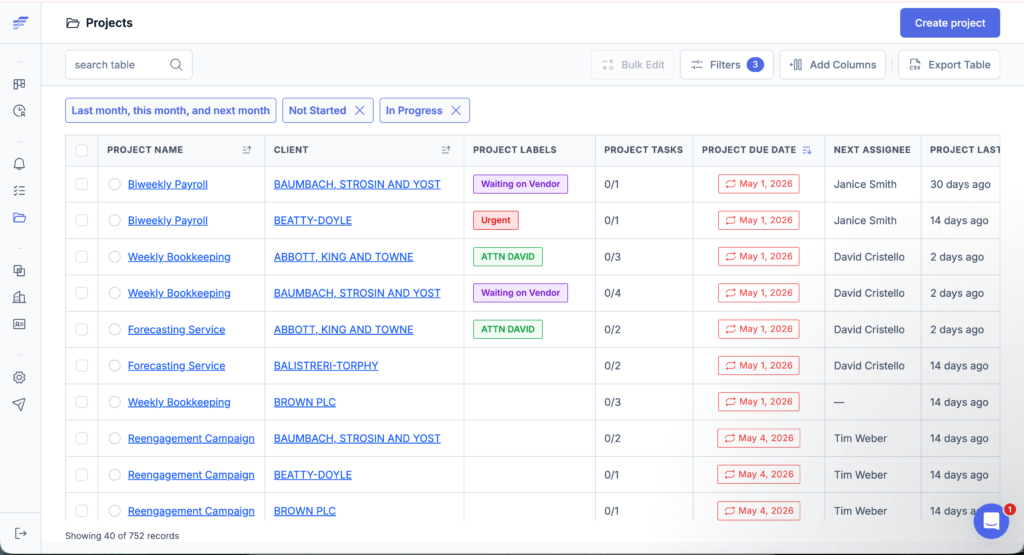
A firm can use Jetpack Workflow to manage services such as:
- Monthly bookkeeping
- Month-end close
- Payroll processing
- Sales tax filings
- Tax return preparation
- Client onboarding
- Accounts payable and receivable
- Financial reporting
- Tax planning
- Client advisory services
Its main value is operational visibility. Firm owners and managers can see what is due, what is overdue, who owns each task, how client work is progressing, and what is scheduled next. Starter includes unlimited clients, projects, and templates. Premium adds time tracking, budget-versus-actual reporting, and capacity reporting.
Jetpack Workflow is not designed to replace QuickBooks, a full document management system, or a client billing platform. It is designed to control the work that happens around those systems.
What Is Firm360?
Firm360 is an all-in-one accounting practice management platform. It combines operational workflow with client records, document management, a secure client portal, e-signatures, time tracking, billing, payments, reporting, integrations, and tax document automation.
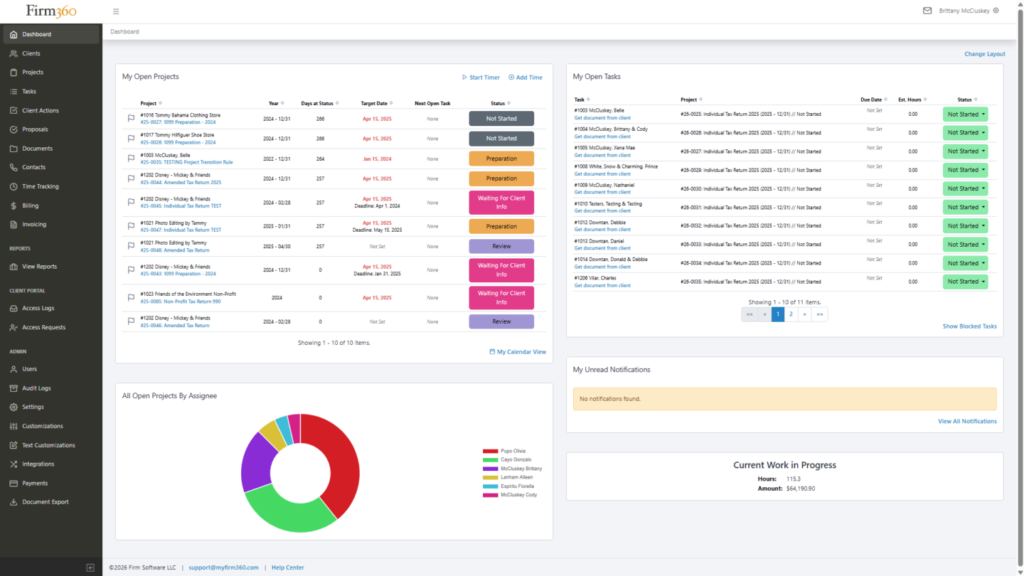
Firm360 can be used to manage:
- Client records and multiple related entities
- Recurring and one-time projects
- Tax deadlines and extension dates
- Documents and revision history
- Secure client requests and messages
- Electronic signatures
- Time entries, invoices, and A/R follow-up
- Credit card and ACH payments
- Firm performance reporting
- Tax document preparation through AutoPrep
The platform is a better fit when a firm wants to reduce the number of separate systems used for practice operations. That broader scope also means implementation involves more decisions about client data, documents, billing, permissions, integrations, and workflow design.
What Is the Main Difference Between Jetpack Workflow and Firm360?
The main difference is product scope.
Jetpack Workflow is a focused workflow system. It helps a firm standardize services, create recurring projects, manage deadlines, assign work, and understand team capacity. It is designed to work alongside the firm’s accounting, document, communication, and billing tools.
Firm360 is a broader practice-management suite. It aims to place internal workflows, client communication, documents, e-signatures, billing, payments, and tax automation inside one connected platform.
That distinction changes the buying decision. A firm that already uses QuickBooks Online, Google Drive or ShareFile, an e-signature tool, and an established client communication process may not need to replace everything. Jetpack Workflow can provide the missing operational layer. A firm trying to consolidate a fragmented technology stack may gain more from Firm360’s wider native feature set.
9 Key Differences Between Jetpack Workflow and Firm360
1. Workflow Focus vs All-in-One Practice Management
Jetpack Workflow puts workflow execution at the center of the product. Clients, projects, templates, tasks, assignments, due dates, and future schedules are the main operating structure.
Firm360 includes those project-management functions from its Standard plan, then connects them with documents, client communication, billing, payments, and reporting. Its Basic plan includes client and document management, a portal, time and billing, payments, and basic reporting, but does not list project management.
Jetpack Workflow is the clearer choice when the firm’s most urgent problem is operational consistency. Firm360 is stronger when the firm wants to consolidate multiple practice-management functions.
2. Recurring Work and Accounting Deadlines
Both platforms support recurring accounting work, so it would be inaccurate to present this as a Jetpack-only capability.
Jetpack Workflow lets firms create reusable templates and recurring project series for bookkeeping, payroll, tax, compliance, and advisory work. Teams can plan work ahead of the final client deadline and view future projects across the firm.
Firm360 also auto-generates recurring projects based on start dates rather than waiting for the previous project to finish. It supports target dates, federal and state deadlines, extension dates, automated assignments, and status transitions.
The practical difference is emphasis. Recurring workflow is Jetpack Workflow’s core product. In Firm360, it is one part of a broader practice-management system.
3. Workflow Templates and Process Changes
Jetpack Workflow offers unlimited workflow templates and customizable automation on Starter. This is valuable when a firm needs to document repeatable services and apply a consistent process across many clients without project limits.
Firm360 supports reusable project templates, visual workflow stages, task dependencies, reviews, approvals, automated status transitions, and complex multi-step engagements. Project management is available from the Standard plan.
Firms should test how each platform handles a real process change. For example, add a new quality-control task to a monthly bookkeeping template and confirm how that change affects future, active, and client-specific projects. The strongest platform is the one that lets the firm improve its procedures without introducing manual cleanup.
Need Better Control of Recurring Work?
Jetpack Workflow gives accounting firms unlimited clients, projects, and workflow templates on Starter, with recurring schedules and team visibility built around deadline-driven services.
4. Client Portal and Client Communication
Firm360 has the clear advantage when a native client portal is required. Its branded portal lets clients upload documents, complete checklist items, exchange secure messages, sign documents, view outstanding tasks, and pay invoices. Firm360 also supports secure upload links that do not require a client login.
Jetpack Workflow focuses primarily on the internal team and the work required to serve each client. Firms normally continue using their existing secure document portal, email, proposal, or communication tools alongside Jetpack Workflow.
If poor client document collection is the firm’s main bottleneck, Firm360’s portal deserves serious consideration. If client-facing systems already work and the problem is internal execution, Jetpack Workflow avoids paying to replace tools the firm does not need to change.
5. Document Management and E-Signatures
Firm360 includes native document management designed for accounting practices. Published features include document organization tied to client records and projects, revision history, audit trails, PDF merge and split tools, image-to-PDF conversion, flexible document import, portal permissions, and e-signatures.
Jetpack Workflow can keep client work and related information organized, but it is not positioned as a full document-management and e-signature suite. Firms with established systems such as ShareFile, SmartVault, Google Drive, Microsoft 365, DocuSign, or another portal may prefer to keep those tools and use Jetpack Workflow for workflow control.
The decision should account for migration risk. Moving years of client documents is a larger project than importing client names and workflow templates.
6. Time Tracking, Billing, and Payments
Jetpack Workflow Premium includes time tracking and budget-versus-actual reporting. Its QuickBooks Online integration can import clients and team members and push time information back to QuickBooks for billing or payroll. Invoicing and payment collection remain outside Jetpack Workflow.
Firm360 includes time tracking and billing in Basic. It also supports invoicing, credit card and ACH payments through Stripe, saved payment methods, automated A/R collections on Standard, and reporting that connects work with revenue and collections.
Firm360 is the stronger fit when a firm wants practice-management workflows and receivables in the same system. Jetpack Workflow is the simpler fit when QuickBooks or another established platform already handles invoicing and payments well.
7. Reporting and Capacity Planning
Jetpack Workflow Premium provides capacity management and budget-versus-actual reporting for staff and services. These reports are aimed at practical workflow questions: who is overloaded, what is unassigned, which services consume more time than planned, and what work is coming next.
Firm360 provides staff workload views inside project management and advanced reporting from Standard. Because it also stores billing, payment, client, and document activity, it can support a broader view of firm operations and financial performance.
Firms should evaluate reporting with their own management questions. A long report library is less valuable than being able to answer five recurring questions quickly and reliably.
Compare the Cost of Workflow Control
Jetpack Workflow Premium is $50 per user per month when billed annually and includes time tracking, budget-versus-actual reporting, and capacity reporting. Firm360 Standard is $79 per user per month with a three-user minimum and adds broader practice-management functions.
8. Integrations and Tax Automation
Jetpack Workflow has a direct QuickBooks Online integration for clients, team members, and time data. Additional connections can be made through Zapier, allowing the workflow platform to sit inside a larger accounting technology stack.
Firm360 lists standard integrations on its Standard plan and access to thousands of applications through Zapier on Premium. Premium also includes an AI Connector and AutoPrep, a tax document automation capability designed to prepare client source documents for tax work.
Firm360 has the advantage when tax-document preparation and a broader integrated suite are priorities. Jetpack Workflow is better suited to firms that want the workflow layer to remain focused and connect it with their preferred specialist tools.
9. Setup, Adoption, and Ongoing Administration
Jetpack Workflow states that firms can be up and running in days. The initial work usually includes importing clients, selecting or building templates, assigning responsibilities, setting recurring schedules, and training the team.
Firm360 describes a guided rollout with account activation, a kickoff call, tailored training, and a typical path of four focused training sessions. Because the platform can manage more areas of the practice, implementation may also include document structure, client portal rollout, billing rules, payment setup, permissions, e-signatures, and integrations.
Neither platform eliminates process design. Firms still need to decide how work should move, who owns each step, what constitutes completion, and how exceptions are handled. Jetpack Workflow generally has a narrower implementation scope. Firm360 can consolidate more tools but requires a wider operational rollout.
Jetpack Workflow vs Firm360 Pricing
Jetpack Workflow has the lower published price for firms that need accounting workflow and project management. Firm360’s Basic plan begins only $9 higher per user, but it does not list project management. For a like-for-like workflow comparison, Firm360 Standard is the more relevant plan.
Jetpack Workflow Pricing
- Starter: $40 per user per month, billed annually. Includes unlimited clients and projects, unlimited templates, customizable automation, team collaboration, change management, live chat, email support, and training.
- Premium: $50 per user per month, billed annually. Includes Starter plus time tracking, budget-versus-actual reporting, and capacity management reporting.
- Trial: 14 days with no credit card required.
Firm360 Pricing
- Basic: $49 per user per month, billed annually, with no user minimum. Includes client management, document management, a secure client portal, time tracking and billing, basic reporting, payments, and e-signature integration for an extra fee. Project management is not listed in this plan.
- Standard: $79 per user per month, billed annually, with a three-user minimum. Adds project management, one e-signature license, automated A/R collections, advanced reporting, custom fields, standard integrations, training, and onboarding.
- Premium: $99 per user per month, billed annually, with a three-user minimum. Adds the AI Connector, AutoPrep tax automation, unlimited e-signature licenses, Zapier access, premium onboarding, a dedicated customer success manager, and phone support.
- For more than 20 users, Firm360 asks firms to request custom pricing.
Example Annual Cost for a Five-Person Firm
| Plan | Monthly Price per User | Annual Cost for 5 Users |
|---|---|---|
| Jetpack Workflow Starter | $40 | $2,400 |
| Jetpack Workflow Premium | $50 | $3,000 |
| Firm360 Basic | $49 | $2,940 |
| Firm360 Standard | $79 | $4,740 |
| Firm360 Premium | $99 | $5,940 |
The example uses published annual per-user rates and excludes taxes, implementation work, payment-processing fees, optional services, and other tools a firm may still need.
Which Platform Costs Less?
Jetpack Workflow costs less when the comparison is centered on workflow and project management. For five users, Starter is $2,340 less per year than Firm360 Standard. Premium is $1,740 less per year than Firm360 Standard while adding time tracking, budget-versus-actual reporting, and capacity reporting.
Firm360 can still provide better total value if its broader capabilities allow the firm to cancel separate subscriptions for document management, client portal software, e-signatures, billing, payment collection, or tax-document preparation.
A fair cost comparison should include:
- Subscription fees
- Minimum user commitments
- Onboarding and data migration
- Document migration
- Portal rollout and client training
- Payment-processing and e-signature costs
- Integrations and automation
- Internal administration
- Software subscriptions that can be cancelled
- The operational cost of keeping disconnected systems
When Is Jetpack Workflow Better Than Firm360?
Jetpack Workflow is generally the better choice when the firm wants a focused system for recurring client work and already has satisfactory tools for documents, communication, and billing.
Consider Jetpack Workflow when your firm needs to:
- Standardize bookkeeping, tax, payroll, compliance, or CAS workflows
- Create unlimited recurring projects and templates without project limits
- Improve deadline visibility and task ownership
- See upcoming work before it becomes urgent
- Monitor capacity and compare budgeted time with actual time
- Keep QuickBooks Online as the billing or payroll system
- Avoid replacing a working document portal or e-signature platform
- Launch a workflow system with a narrower setup scope
- Give employees a focused daily work environment
- Start with a self-service 14-day trial before committing
Jetpack Workflow is particularly relevant to firms with one to 50 employees that have outgrown spreadsheets or generic task tools but do not need a full technology-stack replacement.
When Is Firm360 Better Than Jetpack Workflow?
Firm360 may be the better choice when consolidating multiple systems is more important than choosing the lowest-cost workflow platform.
Consider Firm360 when your firm needs:
- A native branded client portal
- Secure messages and client document requests tied to projects
- Full document management with version history and audit trails
- Built-in e-signatures
- Time tracking, billing, invoicing, payments, and A/R automation
- Client records that connect projects, documents, communication, and billing
- Tax document automation through AutoPrep
- Broader firm and financial reporting
- A guided demo and onboarding process
- One vendor for several core practice-management functions
Firm360’s higher price may be reasonable if the firm can remove several other subscriptions and reduce duplicated data across systems.
Which Platform Is Better for Different Types of Accounting Firms?
Solo Accountants and Very Small Firms
Jetpack Workflow Starter offers the lower entry price and has no project or client limits. Firm360 Basic has no user minimum and includes documents, a portal, billing, and payments, but not project management. A solo firm needing workflow should compare Jetpack Starter with Firm360 Standard rather than assuming the Firm360 Basic plan covers the same use case.
Bookkeeping and CAS Firms
Jetpack Workflow is a strong fit for monthly and recurring services because workflow control is the center of the product. Firm360 may be preferable when document collection, secure client communication, billing, and payment follow-up are equally important operational problems.
Tax-Focused Firms
Both platforms can organize tax deadlines and recurring work. Firm360 has the broader tax-practice toolkit because it combines deadline tracking, documents, portal requests, e-signatures, billing, and AutoPrep on Premium. Jetpack Workflow is better when the firm wants to keep its existing tax, document, portal, and billing systems while improving internal workflow.
Growing Multi-Employee Firms
Jetpack Workflow gives managers a focused view of work, ownership, future deadlines, time, and capacity at a lower price. Firm360 gives management a wider view that can include client activity, documents, billing, collections, and operational reporting. The decision depends on whether growth is being constrained mainly by workflow or by fragmentation across the entire practice stack.
7 Questions to Ask Before Choosing
- Which operational problem must be solved first: recurring workflow, document collection, client communication, billing, or all of them?
- Which current tools work well enough to keep?
- Does the firm want one broader platform or a focused workflow system connected to specialist tools?
- Which plan contains the features the firm actually needs, rather than simply comparing entry prices?
- How many users are required, and do minimum user commitments affect the budget?
- What client data, project history, documents, time entries, and billing records must be migrated?
- Can managers answer their five most important workflow and profitability questions from the available reports?
How to Move From Firm360 to Jetpack Workflow
A move from an all-in-one platform to a workflow-focused system requires a clear plan for the functions that will remain outside Jetpack Workflow. Do not begin by exporting every field and document.
Step 1: Define the Future Technology Stack
Decide which systems will manage documents, client communication, e-signatures, invoicing, payments, and tax preparation after the move. Confirm integrations and ownership before migrating projects.
Step 2: Audit Active Clients and Services
Export active clients, contacts, services, open projects, recurring schedules, staff assignments, due dates, and client-specific exceptions. Separate active operational data from old records that only need to be archived.
Step 3: Document the Firm’s Core Workflows
Group work by service and record the tasks, order, role, due-date logic, recurrence, review steps, instructions, and exceptions for each process.
Step 4: Build and Test Templates
Start with one high-volume or high-risk service, such as monthly bookkeeping or individual tax returns. Test the template with a small client group before rolling it out firm-wide.
Step 5: Import Clients and Assign Projects
Import the cleaned client list, connect each client to the right service workflow, set recurring schedules, and confirm assignments and due dates.
Step 6: Validate Reports and Integrations
Confirm that employees can find their work, managers can see overdue and future projects, capacity reporting is meaningful, and QuickBooks or other connected tools receive the expected data.
Step 7: Archive Firm360 Data and End the Overlap
Retain required historical documents and financial records according to the firm’s retention policy. Use a short overlap period, then establish one system as the source of truth for every function to avoid duplicate work.
Jetpack Workflow vs Firm360: Which Should You Choose?
Choose Jetpack Workflow if your firm’s main goal is to standardize recurring accounting work, prevent missed deadlines, clarify task ownership, plan future work, and understand team capacity without replacing the rest of the technology stack.
Choose Firm360 if your firm wants a broader system that combines workflow with client management, document storage, a portal, e-signatures, billing, payments, reporting, and tax automation.
For many accounting and bookkeeping firms, the decision comes down to one question:
Does the firm need a better workflow system, or does it need to replace most of its practice-management stack?
If workflow is the priority, Jetpack Workflow provides the more direct and affordable path. Its Starter plan includes unlimited clients, projects, and templates, while Premium adds the time, budget, and capacity reporting growing firms need.
If you are comparing more than these two platforms, review the Firm360 alternatives for accountants guide for additional options.
See Jetpack Workflow With Your Own Client Work
Start with one recurring service, build the workflow, add a small client group, and test whether your team gains clearer ownership and deadline visibility.
Frequently Asked Questions
Is Jetpack Workflow better than Firm360?
Jetpack Workflow is generally better when an accounting firm mainly needs recurring workflow management, deadline tracking, process standardization, and team capacity at a lower price. Firm360 may be better when the firm also needs native document management, a client portal, e-signatures, billing, payments, and tax automation.
What is the main difference between Jetpack Workflow and Firm360?
Jetpack Workflow is focused on internal accounting workflow and project management. Firm360 is a broader accounting practice-management platform that combines workflow with client records, documents, portal communication, e-signatures, billing, payments, reporting, and tax automation.
Do Jetpack Workflow and Firm360 both support recurring projects?
Yes. Both platforms support recurring accounting projects and reusable workflow templates. Jetpack Workflow makes recurring work the center of its product, while Firm360 includes it within its Standard and Premium practice-management plans.
Does Firm360 have a client portal?
Yes. Firm360 provides a secure, branded client portal where clients can upload documents, complete requests, send messages, sign documents, view tasks, and pay invoices.
Does Jetpack Workflow have a client portal?
Jetpack Workflow is primarily focused on internal workflow management and does not position a full native client portal as a core product feature. Firms can continue using their preferred document and client communication tools alongside Jetpack Workflow.
Which is cheaper, Jetpack Workflow or Firm360?
Jetpack Workflow has the lower published price for workflow management. Starter costs $40 per user per month when billed annually. Firm360 Standard, the first plan that lists project management, costs $79 per user per month when billed annually and has a three-user minimum.
Does Jetpack Workflow include unlimited clients and projects?
Yes. Jetpack Workflow Starter and Premium include unlimited clients and projects. Starter also includes unlimited workflow templates and customizable automation.
Which platform is better for bookkeeping firms?
Jetpack Workflow is often the better fit when the priority is recurring monthly work, deadlines, assignments, and capacity. Firm360 may be better when the bookkeeping firm also wants client document collection, secure communication, billing, and payments in the same platform.
Which platform is better for tax firms?
Firm360 offers the broader native tax-practice toolkit, including deadline tracking, documents, portal requests, e-signatures, billing, and AutoPrep on Premium. Jetpack Workflow is a strong choice when the firm already has those systems and mainly needs better internal tax workflow.
Can Jetpack Workflow replace QuickBooks?
No. Jetpack Workflow manages the people, tasks, deadlines, and processes involved in client work. QuickBooks manages accounting records, invoicing, payroll, and financial transactions. Jetpack Workflow can connect with QuickBooks Online.
Can a firm migrate from Firm360 to Jetpack Workflow?
Yes. The firm should first decide which systems will manage documents, portal communication, e-signatures, and billing after the move. It can then clean its client data, document workflows, build templates, import clients, test recurring schedules, and validate reporting before ending the overlap.
Does Jetpack Workflow offer a free trial?
Yes. Jetpack Workflow offers a 14-day free trial with no credit card required. Firm360 directs prospective buyers to request a demo.