Claude Cowork for Accountants: Toni Witt on Building Real AI Systems
Toni Witt’s workshop showed how accounting firms can move from one-off AI chats to reusable systems. He demonstrated the role of projects, skills, connectors, and MCPs, then used Claude in Excel with a QuickBooks Online connection to pull financial data, inspect a general ledger, and prepare a cash flow forecast. His main message was practical: define the process, give the agent the right data and tools, keep permissions narrow, and require human review before accounting outputs are finalized.
Key Takeaways
- Claude Cowork is most useful for active, hands-on work involving local files and multi-step instructions.
- Projects provide task-specific context, while skills provide repeatable instructions.
- Connectors and MCPs allow an AI agent to read from or act inside other tools.
- Excel-based work is a strong starting point because firms already have source data, templates, and expected outputs.
- An AI agent can assist with first-pass reviews, data transformation, forecasting, and workpaper preparation.
- Firms should restrict access, disable unnecessary capabilities, use trusted connectors, and keep a human in the loop
- AI performs better when the underlying accounting workflow is documented and consistent.
Accounting firms have spent several years experimenting with chat-based AI. A team member enters a prompt, receives a draft, makes changes, and moves on.
That can save time, but it does not create an operating system for the firm.
In his workshop at Jetpack Workflow’s Growing Your Firm AI + Tech Summit, Toni Witt, co-founder and CEO of Sweet, focused on the next step: using Claude Cowork to create systems that can work across files, spreadsheets, instructions, and connected applications.
Witt’s session was not a promise that AI can take over an accounting department. It was a practical demonstration of how an agent can complete parts of a defined process when it has the right context, access, and controls.
What Is Claude Cowork?
Claude Cowork is an agentic workspace available through the Claude desktop environment. Instead of producing only a single response, it can work through a larger task, access approved files and folders, use reusable instructions, and interact with connected tools.
The difference is best understood through the type of assignment each approach supports.
A standard AI chat might answer, “What should a 13-week cash flow forecast include?”
An agentic workflow might read historical financials, examine open invoices and an employment contract, create a forecast workbook, document assumptions, and revise the output after review.
That does not mean every recurring automation belongs inside Cowork. Witt distinguished active desktop work from unattended workflows. Cowork is a strong fit when a person is sitting down to review a file, reformat a schedule, manipulate a workbook, or prepare a deliverable. Trigger-based processes that must run overnight or when an external event occurs may require a separate automation platform or a remote routine.
Anthropic’s current documentation describes Cowork, skills, connectors, and related desktop capabilities, but features are changing quickly. Firms should confirm current availability and plan requirements before designing a rollout.
The Four Building Blocks Toni Witt Demonstrated
1. Projects Provide Focused Context
A project gives Claude access to a defined set of files and instructions related to a particular client, task, or area of work.
Witt showed a project he uses for LinkedIn content. The project contains a local context file describing his tone, post structure, successful examples, and performance information. When he starts a new post, Claude does not begin with a blank slate. It can reference the material stored for that purpose.
The accounting application is straightforward. A firm could create a project for:
- A specific client or related client group
- A monthly reporting package
- A tax return review process
- A recurring forecasting engagement
- A depreciation or fixed-asset workpaper
- An internal training or content program
The goal is not to upload every firm file into one large context. It is to give the agent only the material needed for the job.
That improves relevance and reduces risk. A forecasting project should not need unrestricted access to unrelated client folders. A tax-review project should use the approved workpapers, checklist, and examples for that process.
2. Skills Turn Instructions Into Repeatable Work
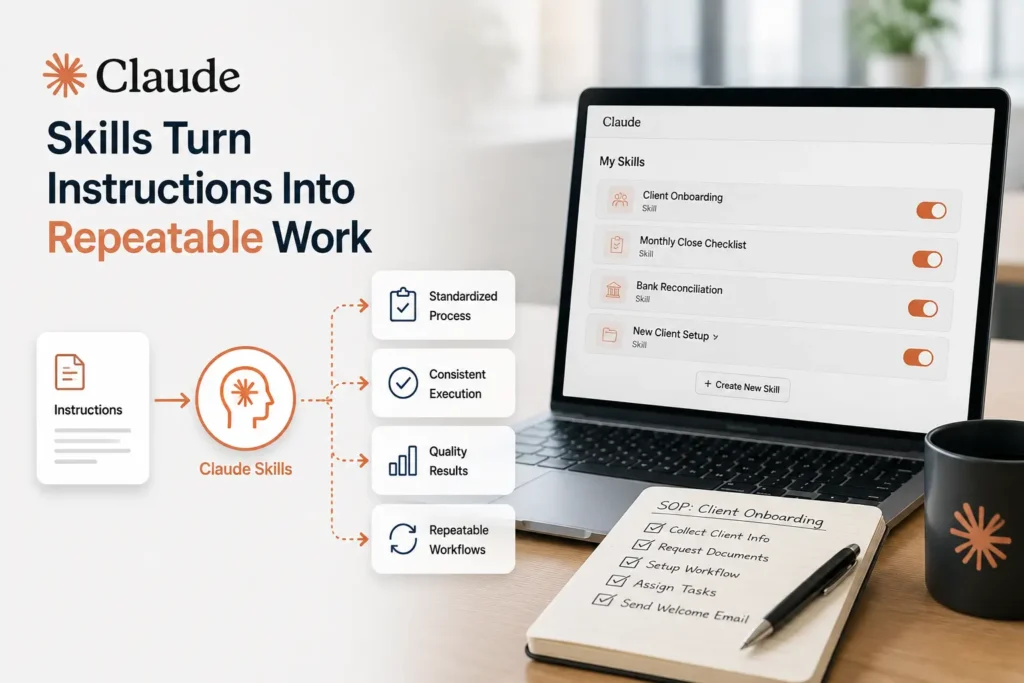
Witt described skills as SOPs for an AI agent. They contain reusable instructions, resources, and logic for a task that happens more than once.
For example, he demonstrated a skill that could take bank statements, extract transactions, organize them, ask questions about uncertain classifications, and produce a workbook with assumptions and mapped categories.
The value is not only the output. The skill preserves how the task should be approached. Instead of relying on a team member to remember a long prompt, the firm can improve and reuse the same process.
According to Anthropic’s skills documentation, skills can contain instructions, scripts, and resources that Claude loads for specialized work. For accounting firms, that may include:
- Required source files
- A sequence of review steps
- Formatting rules
- Materiality thresholds
- Questions to ask when information is missing
- Known failure cases
- The required output format
- A final review checklist
A useful skill should not hide the firm’s process. It should make the process clearer and easier to test.
3. Connectors Give the Agent Access to Other Systems
An agent becomes more useful when it can reach the systems where work and data already live. Connectors can provide access to email, calendars, file storage, practice management, CRM, accounting platforms, meeting transcripts, and other applications.
Witt also discussed Model Context Protocol, commonly called MCP. In practical terms, MCP creates a standard way for an AI tool to use approved capabilities from another application.
The accounting implication is significant. An agent may be able to retrieve source data, place information into a workbook, create a draft record, or send an approved instruction to another system without requiring a person to copy and paste between every screen.
This also changes how firms should evaluate technology. A closed platform with no workable integration path can limit future automation. When reviewing software, firms should ask:
- Does the tool provide a supported API, connector, or MCP?
- Which data can be read?
- Which actions can be written?
- Can permissions be limited by user, client, folder, or action?
- Is there an audit trail?
- Can high-risk actions require approval?
- What happens when the connection fails?
Jetpack Workflow has an existing Zapier integration and can be connected to other firm systems for workflows such as client creation and job setup. Current supported actions should be confirmed in the live integration before implementation.
4. Claude in Excel Brings AI Into an Existing Workpaper
For many accounting teams, Excel is the most practical place to begin because the firm already has templates, source data, formulas, and known outputs.
Witt demonstrated Claude working inside Excel rather than repeatedly generating new workbooks from a separate chat. This allowed him to keep the existing file structure while asking the agent to inspect data, add tabs, retrieve financial information, and prepare an analysis.
This can be useful when a firm wants to:
- Preserve an established workbook format
- Populate an existing reporting package
- Explain a complex legacy spreadsheet
- Review formulas and identify possible errors
- Convert source data into an import template
- Prepare a first draft of a forecast
- Create an assumptions tab for client discussion
The agent still needs clear instructions. A workbook that only one senior person understands is not automatically safe because AI can open it. The firm should explain what the workbook is for, which cells are inputs, which formulas must remain unchanged, and how the result is reviewed.
The QuickBooks and Excel Demonstration
Witt used a custom QuickBooks Online MCP created by his team to demonstrate how Claude could work with accounting data across multiple client files.
During the session, he showed the agent retrieving financial information, placing a profit and loss statement and balance sheet into Excel, adding general ledger transactions to a separate tab, and preparing a 13-week cash flow forecast using historical data and additional source documents.
The demonstration highlighted several possible workflows.
General Ledger Review
An agent can organize ledger data, apply filters, and prepare the file for review. With a well-defined checklist, it can also flag unusual balances, missing mappings, unexpected movements, or formula issues for a human reviewer.
Data Transformation
The same pattern can support recurring imports. The firm provides a source file, a destination template, and the rules for moving data between them. Once tested, the process can become a reusable skill.
Cash Flow Forecasting
Witt combined historical financial data with invoices and an employment agreement to create a draft cash flow forecast. The output included an assumptions area that could be adjusted to explore different scenarios.
This is a useful example of AI supporting advisory work. It can accelerate the first draft and organize inputs, but the accountant still evaluates whether the assumptions make sense and whether the forecast reflects the client’s reality.
First-Pass Workpaper Review
Claude can inspect formulas, trace calculations, and identify possible inconsistencies. For a firm with long-standing spreadsheets, it may also help explain how the workbook functions and document knowledge that currently sits with one employee.
The right position is review assistant, not final approver. AI can surface issues. The responsible professional decides whether those issues are valid and what action should follow.
Why Documented Workflows Matter Before AI

Witt’s demonstrations worked because the assignment had recognizable inputs and expected outputs. That is the part many firms skip.
If a process changes from one team member to another, the agent does not have a stable target. If source files are inconsistent, the agent must guess how to interpret them. If no one can explain the review rules, the firm cannot verify whether the output is correct.
Before building an agent, document:
- The trigger that starts the process
- The required source documents
- The steps currently performed
- The decisions made by experienced staff
- Common exceptions
- The expected deliverable
- The reviewer and approval criteria
- The deadline and recurring schedule
Firms can use Jetpack Workflow’s 32 free accounting workflow templates to start defining recurring work. Once the human workflow is clear, the firm can decide which steps are good candidates for AI.
This is also why a workflow platform remains relevant. AI may perform part of the work, but the firm still needs to know whether the client job was created, whether the input arrived, whether the review is complete, and whether the deadline is at risk.
Security and Control Questions Accounting Firms Must Address
Witt devoted part of the session to security and privacy. His most important operational recommendation was to reduce unnecessary access and maintain human accountability.
Every firm should conduct its own legal, compliance, insurance, and security review. Tax information, client confidentiality, retention requirements, and professional obligations can vary by service and jurisdiction. A webinar should not replace that review.
At a minimum, firms should consider the following controls.
Use an Organization Plan With Administrative Controls
Business and enterprise plans generally provide stronger administrative, identity, access, and data controls than personal accounts. Anthropic describes its Enterprise plan as including advanced security and compliance capabilities. Firms should review the current terms, retention options, subprocessor information, and plan documentation before approving client-data use.
Apply Least-Privilege Access
Give the agent only the tools and actions needed for the process. If a workflow only needs to read a folder and prepare a draft, it should not have permission to delete files, send messages, or alter unrelated records.
Require Approval for External or Financial Actions
Sending an email, posting a journal entry, changing a client record, or submitting a filing should not happen silently. Use approval steps for actions that affect clients, books, deadlines, or external communications.
Use Trusted Connectors
Only install connectors or MCPs from vendors the firm has reviewed. A connection can expose the data and permissions available to it. The firm should know who operates the connector, how authentication works, what is logged, and how access can be revoked.
Keep a Human in the Loop
AI errors remain the firm’s responsibility when the firm relies on the output. A qualified person should review accounting conclusions, client-facing documents, tax work, and changes to source systems.
Test With Low-Risk Data First
Begin with sample data, redacted files, or an internal process. Run the same task several times and compare results. Document failure cases before adding client information or write access.
A Five-Step Rollout for Claude Cowork in an Accounting Firm
Step 1: Choose One Existing Workflow
Select an Excel-heavy or document-heavy task with clear inputs and a known output. Do not begin with the most sensitive or complex process in the firm.
Step 2: Build the Context
Create a focused project containing the approved examples, instructions, templates, and reference files. Remove unrelated documents.
Step 3: Create and Test a Skill
Write the process as a series of steps. Include questions the agent must ask, conditions that should stop the workflow, and the required review output.
Step 4: Add Only the Required Connections
Connect the systems needed for the test. Keep write actions disabled until the firm has reviewed results and permissions.
Step 5: Put the Work Inside the Firm’s Operational Workflow
Assign the task, deadline, and reviewer in Jetpack Workflow. Record when the agent ran, where the output is stored, who approved it, and what happens when an exception appears.
This turns an interesting AI demo into a process the firm can manage. To see how Jetpack Workflow standardizes recurring work and tracks deadlines, visit How It Works.
The Practical Bottom Line
Claude Cowork can help accountants do more than draft text. With the right setup, it can work across files, spreadsheets, and connected tools to support real accounting processes.
The opportunity is strongest when firms treat AI as a process participant rather than a magic answer box. The firm defines the work. The agent assists with approved steps. A human reviews the result. The workflow system keeps the job visible from start to finish.
If your firm wants to automate more work, begin by organizing the processes that AI will depend on.
Frequently Asked Questions
What is Claude Cowork used for in accounting firms?
Accounting firms can use Claude Cowork to work with files, prepare or revise spreadsheets, apply reusable instructions, review workpapers, transform source data, and coordinate tasks across approved connected tools.
What is the difference between a Claude project and a skill?
A project provides focused context, such as files and instructions for a client or work area. A skill provides a reusable method for completing a particular task. A project answers what information applies, while a skill explains how the work should be done.
Can Claude work with QuickBooks Online?
Claude can interact with QuickBooks Online when an appropriate supported connector, MCP, API-based integration, or automation layer is available. The exact read and write capabilities depend on the connection and permissions used.
Can Claude review accounting spreadsheets?
Claude can help inspect formulas, organize data, explain workbook logic, and flag possible issues. A qualified accountant should still verify the calculations, assumptions, source data, and final conclusions.
Is Claude Cowork safe for client data?
Safety depends on the plan, configuration, data, connector, permissions, and the firm’s own compliance obligations. Firms should use approved organizational accounts, limit access, review vendor terms, require human approval for high-risk actions, and complete a formal security and legal review.
Related Articles
- Ira Rosenbloom on Accounting Firm Succession Planning: Build a Profitable Firm That Lasts
- Selling an Accounting Firm: How Mike Payne Scaled, Merged, and Planned His Next Chapter
- Accounting Firm Growth: How Yuri Kapilovich Built a $290K Firm as a Team of One
- How Adam Shay Scaled and Sold a $2.5M Accounting Firm
- Joe Manganelli’s Accounting Firm Growth Strategy Behind Calculate’s $10M Success
- AI for Accounting Firms: Isaac Perdomo on Automating Workflows and Efficiency
- How Jeff Seibert Is Using AI Accounting Firm Automation to Build a 90% Automated Firm
- Tax Resolution for Accountants: Michael Rozbruch Explains a $100K Opportunity in Your Client Base
Turn AI Into a Practical Part of Your Firm
AI works best when it supports well-defined processes, not replaces them. Jetpack Workflow helps accounting firms organize recurring work, assign clear ownership, and keep every engagement on schedule, making it easier to integrate AI into everyday operations.
Discover how Jetpack Workflow helps firms build reliable, AI-ready workflows.
Share this article