remote accounting firm using EOS to scale team from 6 to 10 employees and improve workflow management

A remote accounting firm scaled quickly by first building strong systems using EOS (Entrepreneurial Operating System). Instead of relying on ads, growth came from long-term relationships. Clear roles, weekly meetings, time tracking, and proactive workflows helped the team handle rapid client and team growth without operational chaos.

Key Takeaways

  • EOS helps remote accounting firms define roles, priorities, and accountability before scaling

  • Slow, intentional growth builds systems that can handle rapid expansion later

  • Relationship-driven marketing can generate high-quality inbound clients over time

  • Time tracking and effective hourly rate are critical for managing profitability

  • Weekly workflows and proactive communication help reduce workload pressure and improve team capacity

Jetpack Workflow Free Trial

Introduction

Scaling a remote accounting firm is rarely just about getting more clients. Most firms struggle when growth outpaces their systems, leading to overwhelmed teams, inconsistent processes, and missed deadlines.

In this case, the firm took a different approach. Led by Ben Curtis, CPA, Cofounder and CEO of Good Measure Financial, the team spent years building a strong operational foundation using EOS before experiencing rapid growth. Instead of rushing to scale, they focused on structure, accountability, and having the right people in the right roles.

“We really intentionally grew slowly… building a solid foundation with the right team members and the right systems in place.”- Ben

That decision made all the difference when growth accelerated.

Because their systems were already in place, they were able to scale from 6 to 10 team members in just 90 days without creating operational chaos or sacrificing service quality.

How did this remote accounting firm scale so quickly?

The firm grew from 6 to 10 team members in about 90 days, but the growth itself was not sudden in origin.

It came from years of relationship-building.

Rather than relying heavily on ads or outbound tactics, the firm focused on:

  • Building trust with referral partners

  • Having consistent conversations with their network

  • Providing value without expecting immediate returns

Over time, these efforts compounded and led to a strong pipeline of aligned clients.

How does EOS help a remote accounting firm scale?

The firm uses EOS as a flexible framework, not a rigid system. They apply what works and ignore what does not fit their size or structure.

Key EOS elements they rely on include:

  • Vision Traction Organizer (VTO) for clarity and direction

  • Weekly Level 10 (L10) meetings for accountability

  • Clear role ownership across leadership

  • Quarterly priorities to stay focused

These systems ensure the team stays aligned even during periods of rapid change.

How are roles structured in a growing remote accounting firm?

Clear role definition was established early and maintained as the firm scaled.

Responsibilities were divided across leadership functions:

  • Operations, systems, and team management

  • Sales, marketing, and relationship development

They also separate ownership from operational roles, which helps maintain accountability and avoid confusion as the team grows.

What KPIs does the firm use to manage growth?

The firm focuses on a small number of metrics that drive most operational decisions.

Core KPIs include:

  • Time tracking (actual vs expected)

  • Effective hourly rate

  • Team capacity

  • Service line performance

Time tracking is especially important, not as a control mechanism but as a diagnostic tool.

“The time tracking allows us to actually have all those conversations… there’s always a story behind the numbers.” – Ben

These insights help identify inefficiencies, pricing issues, and training opportunities.

How does the firm manage workload and capacity?

To avoid burnout and bottlenecks, the firm actively manages how work is distributed throughout the month.

Instead of concentrating tasks in a short closing window, they:

  • Shift work earlier in the month

  • Break tasks into smaller, consistent workflows

  • Monitor team capacity regularly

This approach creates a more balanced workload and improves team performance.

How do weekly workflows reduce operational stress?

The firm uses weekly workflows to reduce the pressure of monthly deadlines.

Examples include:

  • Weekly reconciliations

  • Regular data syncing

  • Ongoing accounts receivable tracking

  • Continuous financial review processes

While this may seem less efficient on paper, it creates a smoother operational rhythm and reduces last-minute stress.

Why proactive communication is critical for scaling firms

Missing client information is one of the biggest causes of delays in accounting workflows.

To address this, the firm prioritizes proactive communication.

Their approach includes:

  • Requesting data earlier

  • Using tools to gather context efficiently

  • Reducing unnecessary follow-ups

This helps maintain consistent delivery timelines even as the client base grows.

Why founder-led sales still works at this stage

Founder-led sales continues to play a key role in the firm’s growth.

This approach works because:

  • Founders communicate value clearly

  • Trust builds faster

  • Close rates remain high

The firm focuses on alignment rather than aggressive selling.

“You don’t sell what you don’t believe in… prospects can sniff that out.” –  Ben

This ensures they attract the right clients and build long-term relationships.

Conclusion

Scaling a remote accounting firm is not just about acquiring more clients. It is about building the systems that support growth.

This firm succeeded because it:

  • Built a strong operational foundation using EOS

  • Invested in relationships over time

  • Focused on key performance metrics

  • Managed team capacity intentionally

When growth came, they were prepared.

That preparation is what allowed them to scale from 6 to 10 team members in 90 days without losing control.

Frequently Asked Questions

What is EOS in accounting firms?
EOS is a framework that helps accounting firms define roles, set priorities, and improve accountability through structured processes.

Why is EOS effective for remote accounting firms?
EOS provides structure and clarity, which helps remote teams stay aligned and operate efficiently.

What metrics should accounting firms track when scaling?
Firms should track time, effective hourly rate, team capacity, and client profitability.

How can accounting firms handle rapid growth without burnout?
By smoothing workloads, using consistent workflows, and building systems before scaling.

Is founder-led sales scalable for accounting firms?
It works well in early stages by improving trust and conversion rates, though it may need to evolve as the firm grows.

Related Articles

Improve Your Accounting Firm’s Workflow and Capacity

Scaling your firm requires more than just more clients. With the right systems, task management, and visibility across your team, you can grow without overwhelming your staff.

Start your free trial and see how better workflows can support your firm’s growth.

See How It Works

See Jetpack Workflow In Action

Get under the hood of Jetpack Workflow’s accounting workflow and project management platform. See some of the top features and how it helps your firm standardize, automate, and track client work more efficiently.
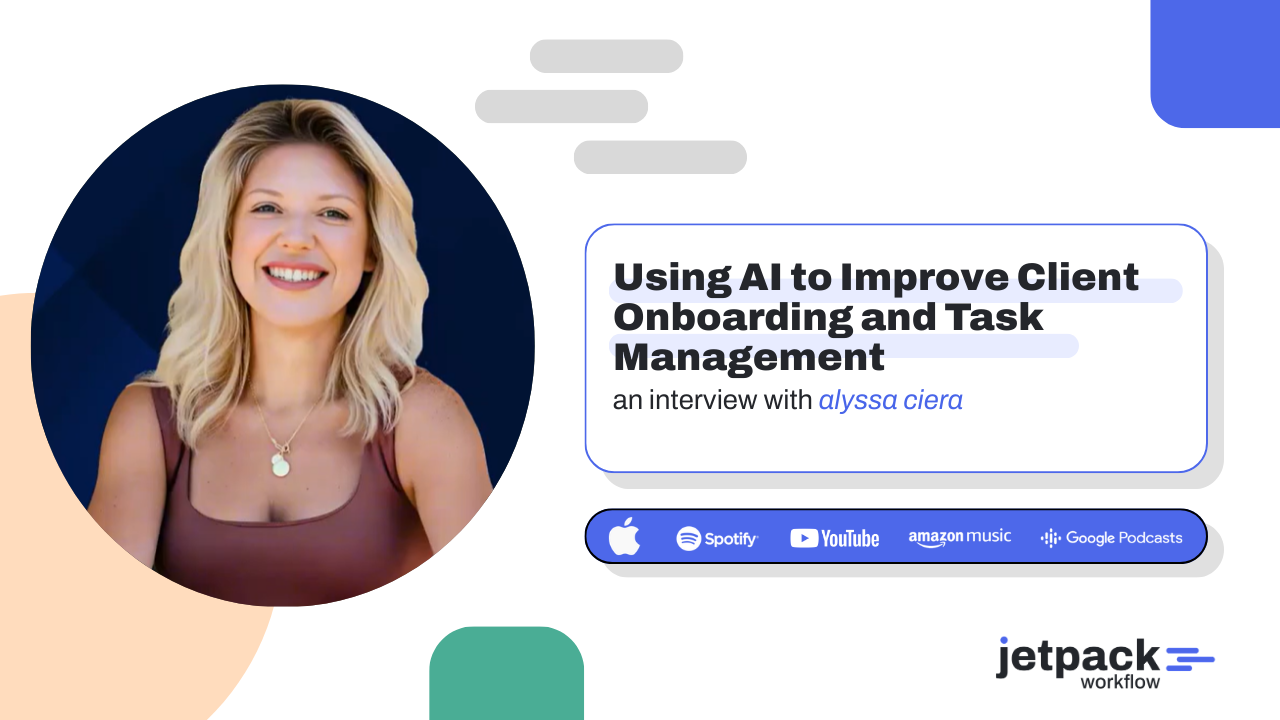
Using AI to Improve Client Onboarding and Task Management

Accounting firms can significantly improve client experience and internal efficiency by using AI during onboarding and task management. Tools like Otter AI, ChatGPT, and workflow systems help automate call summaries, create task lists, and streamline follow-ups while keeping communication clear and personalized. By combining automation with structured workflows, firms can deliver faster service without losing the human touch.

Key Takeaways

  • AI can automate client call notes, follow-up emails, and onboarding tasks.

  • Recording tools like Otter AI help prevent missed details and miscommunication with clients.

  • ChatGPT can convert call transcripts into task lists and client summaries.

  • Automation improves client experience while reducing administrative workload for firm owners.

Jetpack Workflow Free Trial

Introduction

Improving the client experience in an accounting firm often depends on how well onboarding and communication are handled. Many firms struggle with missed details after discovery calls, inconsistent follow-ups, and scattered task management systems.

At a recent industry summit session, Alyssa J. Ciera, CEO and Founder of Ciera + Co. Consulting & Cashflow, shared how her firm uses AI tools and automation to streamline the client onboarding journey and manage internal tasks more efficiently.

When she launched her firm in 2016, most of these tools did not exist, and processes required significant manual effort. Today, AI allows accounting firms to automate repetitive work while maintaining a strong client relationship.

Today, we can create a way better experience for our clients with the use of AI, and still make it feel like it has that human touch.” – Alyssa

How can AI improve the client onboarding experience?

AI improves onboarding by automating communication and preparing both the firm and the client before the first conversation takes place.

According to Ciera, automation should begin the moment a prospect schedules a call. Calendar tools such as Calendly or Acuity can trigger automated workflows that begin preparing the client immediately.

These workflows may include:

  • Sending a welcome email introducing the firm

  • Sharing testimonials or client success stories

  • Providing instructions on what to expect during the consultation

These early touchpoints help warm up the client before the call even begins.

Instead of entering a meeting cold, the client already understands the firm’s approach, which creates a more productive conversation and a better first impression.

Why recording client calls improves communication

Discovery calls often include a large amount of information about the client’s business, financial systems, and goals. Remembering every detail after the call can be difficult.

Ciera recommends using AI call transcription tools to record and summarize conversations automatically.

Her firm uses Otter AI to join Zoom calls and generate transcripts of every meeting. These transcripts provide a complete record of the discussion and help prevent misunderstandings later.

“If you don’t have something recording your calls, it’s going to save your life so many times.” – Alyssa

Having a transcript allows the team to verify what was discussed if questions arise about pricing, services, or expectations.

It also eliminates the stress of relying entirely on memory or handwritten notes after a client conversation.

How AI can turn call transcripts into tasks

One of the most valuable uses of AI is converting call transcripts into actionable work.

After each client call, Ciera’s team feeds the transcript into ChatGPT. The AI then analyzes the conversation and generates structured outputs that the team can use immediately.

These outputs include:

  • A summary of the conversation

  • A list of client needs and service requirements

  • A follow-up email summarizing the discussion

  • A checklist of documents and information needed for onboarding

This process allows the firm to quickly transform a conversation into an organized action plan.

“We take that transcript and ask AI to tell us everything we need to gather from the client.” – Alyssa

Instead of manually reviewing notes and creating task lists, the team receives an organized set of next steps within seconds.

How AI helps automate follow-up emails

Follow-up communication is one of the most important steps in the onboarding process.

Using AI-generated summaries, firms can quickly send personalized emails after client calls. These messages may include:

  • A recap of the discussion

  • The services proposed during the call

  • Next steps for moving forward

  • Instructions for scheduling the onboarding meeting

If the client has not yet made a decision, the email can simply invite them to reply when they are ready to proceed.

This approach keeps communication clear and professional while reducing the time spent writing follow-up messages manually.

How structured task management improves firm operations

AI becomes even more powerful when it is combined with a structured workflow system.

In Ciera’s firm, each client’s work is organized into task “buckets” that represent different service areas.

Examples include:

  • Sales tax tasks

  • Income tax tasks

  • Weekly or daily bookkeeping tasks

  • Month-end closing procedures

  • Cleanup and catch-up work

  • Client onboarding tasks

Within each bucket are detailed tasks assigned to specific team members.

When a new client signs up, the onboarding workflow automatically creates the necessary tasks and assigns them to the appropriate team members.

This ensures the firm follows a consistent process for every new engagement.

How AI can generate onboarding checklists

AI tools can also generate detailed onboarding checklists based on information gathered during client conversations.

For example, after analyzing a call transcript, ChatGPT might recommend tasks such as:

  • Request access to QuickBooks or accounting software

  • Gather bank account and credit card statements

  • Confirm payroll provider information

  • Collect prior tax returns or financial reports

  • Identify integrations required for the client’s workflow

Instead of building these lists manually, firms can quickly generate them using AI prompts.

relationship.

“The beauty is in the prompt. If you give AI your transcript and ask it to create tasks, it can build the entire list for you.” – Alyssa

This approach ensures that important details are not overlooked during onboarding.

Conclusion

AI is rapidly transforming how accounting firms manage client communication and internal workflows. By using tools that record calls, summarize conversations, and generate onboarding tasks, firms can create a smoother client experience while reducing administrative workload.

As demonstrated by Alyssa J. Ciera, combining AI tools with structured task management systems allows firms to streamline operations and deliver consistent service without increasing complexity.

Workflow systems help bring all of these processes together, giving accounting firms the visibility and structure they need to manage recurring client work effectively.

Frequently Asked Questions

How can AI improve client onboarding in accounting firms?

AI can automate communication, summarize calls, generate follow-up emails, and create onboarding task lists, making the process faster and more consistent.

What AI tools are useful for accounting firms?

Popular tools include ChatGPT for generating summaries and task lists, Otter AI for call transcription, and workflow platforms that manage deadlines and tasks.

Why should accounting firms record discovery calls?

Recording calls helps ensure that important details are not forgotten and provides a reference point if questions arise later about services or pricing.

Can AI generate task lists for accounting workflows?

Yes. AI tools can analyze call transcripts and automatically generate task lists based on client needs and services discussed.

Does AI replace the human relationship with clients?

No. AI handles administrative tasks so accountants can spend more time providing advice and building relationships with clients.

Is AI affordable for small accounting firms?

Many AI tools are relatively inexpensive compared to the time savings they provide. For example, ChatGPT subscriptions and call transcription tools are widely accessible.

Related Articles

Enhance Client Experience with Smarter Accounting Workflows

Many accounting firm bottlenecks come from scattered notes, missed follow-ups, and unstructured onboarding processes. Jetpack Workflow helps firms standardize recurring tasks, track client work, and maintain clear visibility across the team. Create a smoother onboarding experience and keep client work organized without adding more administrative work.

See How It Works

See Jetpack Workflow In Action

Get under the hood of Jetpack Workflow’s accounting workflow and project management platform. See some of the top features and how it helps your firm standardize, automate, and track client work more efficiently.
Real Claude AI Use Cases for Accountants

Accountants are already using Claude as a practical “AI coworker” for spreadsheets, workpapers, automation, financial analysis, and even building internal tools. In a recent LinkedIn thread started by Jetpack Workflow founder David Cristello, dozens of accountants shared real examples of how Claude is helping them save hours of work across tax, reporting, and operational tasks.

Key Takeaways

  • Accountants are using Claude to automate document processing and financial data extraction
  • Many firms generate spreadsheets, workpapers, and forecasting models with AI assistance
  • Claude is helping accountants analyze large datasets and identify financial insights
  • Some practitioners are building internal tools and automation workflows using Claude
  • AI is increasingly being treated as a practical “first pass” team member inside accounting firms

Jetpack Workflow Free Trial

Introduction

Artificial intelligence is quickly becoming part of everyday work inside accounting firms. While many conversations focus on the future of AI, a recent community discussion highlighted something more practical: how accountants are already using tools like Claude in their daily workflow.

In a LinkedIn thread started by David Cristello, accountants and firm owners shared real examples of how they use Claude as an AI coworker.

20 Claude Use Cases for Accountants

Accountants in the community shared dozens of ways they are using Claude AI inside their firms. The examples range from spreadsheet automation to building internal tools and financial analysis workflows.

Use Case How Accountants Use Claude
Spreadsheet Creation Generate workpaper templates, GL summaries, and forecasting spreadsheets
Financial Analysis Analyze thousands of transactions and categorize expenses or improvements
Document Processing Extract data from royalty statements, PDFs, and financial documents
Invoice Automation Convert raw data into invoice templates for QuickBooks and accounting systems
Balance Sheet Reconciliations Automate reconciliation of large transaction datasets
Data Cleanup Identify incorrect records, duplicates, or inconsistent financial data
Tax Planning Tools Build decision trees for tax structuring scenarios
Forecasting Models Generate financial forecasts and client projections
Trial Balance Reports Create Caseware-style trial balance reports from accounting ledgers
CSV Data Conversion Convert bank statement data into CSV files for accounting software
Workflow Cleanup Run first-pass analysis of messy accounting workflows
PDF Data Extraction Convert PDF financial statements into structured Excel data
Internal Tool Creation Build internal reconciliation tools and financial dashboards
ERP Automation Push draft journal entries directly into ERP systems
Expense Categorization Sort transactions into categories for financial reporting
Dashboard Creation Generate financial dashboards and executive summaries
Bookkeeping Cleanup Identify inconsistencies and errors in accounting records
Financial Reporting Create P&L reports from raw credit card transactions
Client Analysis Analyze business performance and trends for advisory services
Content Creation Draft reports, proposals, and marketing materials

Below is a roll up of some of the most interesting real world use cases shared in that discussion.

How accountants are automating document processing and invoicing

Several practitioners shared how Claude is helping them automate tedious document processing tasks.

  • Extracting financial data from royalty statements
  • Converting files into structured spreadsheets
  • Preparing invoice data for accounting systems
  • Reducing manual data entry across multiple file formats

“Built a power automate flow this week that’s triggered by new file(s) uploaded to a specific SharePoint folder. It analyzes and extracts data from royalty statements in various layouts, file types, languages, and currencies. The flow then returns an Excel file formatted for the QBO Spreadsheet Sync Invoice Template.” – Heather Nathan

In this case, AI acts as a bridge between raw financial documents and structured accounting data.

How accountants generate spreadsheets and financial workpapers

Another common use case mentioned in the thread was using Claude to generate financial models and accounting templates.

  • Building cash flow forecasting templates
  • Creating general ledger summaries
  • Generating structured workpaper templates
  • Speeding up spreadsheet design and setup

“Descriptive customized templates for things like cash flow forecasting.” – Tailor Hartman

“Just setup an end of year workpaper Excel,  general ledger summary linked to general ledger detail separated into different tabs for each account number.” – Natalie Lennon FCA

“I have it fashion my work papers and templates. I have to have it make adjustments pretty much every time for errors but it’s still faster than doing it completely myself.” – Chelsea Monk, EA

How accountants analyze financial data with Claude

AI is also being used to process large financial datasets and identify insights more quickly.

  • Analyzing years of property repair records
  • Categorizing expenses and improvements
  • Creating dashboards and summaries for clients
  • Producing executive reports from raw data

“I used Claude to analyze five years of residential property repairs across sixteen properties. We put over 2000 lines of data in and had it break down repairs versus major improvements and produce an executive overview dashboard. This saved the client $400,000.” – Jan Haugo

How accountants automate reconciliation and reporting

Several accountants shared examples where Claude significantly reduced time spent on reconciliation work.

  • Reconciling thousands of transactions
  • Generating balance sheet reconciliations
  • Preparing amended tax forms
  • Drafting client cover letters

“It built an entire balance sheet reconciliation of about 2000 transactions for a period of nine months. I had to correct a few sums but the data was correct. Saved me about six hours.” – Sharrin Fuller

How accountants build tools and internal automation

Some accountants are using Claude not just for analysis but also to build internal tools.

  • Creating reconciliation web apps
  • Automating PDF to spreadsheet conversions
  • Building accounting assistants connected to ERP systems
  • Generating draft journal entries from documents

“Created a small floorplan reconciliation web app that converts PDF statements into usable data and outputs an Excel variance report.” – Joseph Wyckoff, CPA

“Made an accounting assistant that can listen to voice, read PDFs, analyze images, and push draft journal entries into the ERP system.” – Brandon Mitchell

Why accountants are starting to treat AI like a coworker

A common theme across the discussion was that AI is not replacing accountants. Instead, it is becoming a powerful assistant that handles first pass analysis and repetitive work.

  • Initial data analysis
  • Spreadsheet creation
  • Financial summaries
  • Document extraction
  • Research and idea generation

“Practical wins. Using Claude for first pass analysis has been a real time saver in workflow cleanups.” – CA Archit Bansal

As tools like Claude continue improving, many firms are beginning to treat AI as a daily productivity partner rather than an experimental technology.

Summary: How Accountants Are Using Claude AI

Real examples from accountants show that Claude AI is already being used across many areas of accounting work.

  • Generating spreadsheets and accounting workpapers
  • Analyzing financial datasets and transaction histories
  • Extracting structured data from financial documents
  • Building automation workflows and internal tools
  • Creating financial reports and dashboards
  • Supporting tax planning and advisory services

For many firms, AI tools are becoming a practical productivity assistant that helps accountants complete work faster while focusing more time on advisory and client relationships.

Conclusion

The examples shared by accountants in this discussion show that AI is already becoming a practical tool inside modern firms. From building spreadsheets and workpapers to analyzing financial data and automating repetitive tasks, Claude is helping accountants complete work faster and more efficiently.

While human judgment remains essential, many professionals are beginning to treat AI as a reliable “first pass” team member that supports research, analysis, and workflow improvements across their practice.

Frequently Asked Questions

How are accountants using Claude AI today?

Accountants are using Claude to analyze financial data, generate spreadsheets, automate document processing, build internal tools, and assist with reconciliation and reporting tasks.

Can Claude AI build accounting spreadsheets?

Yes. Many accountants use Claude to generate templates for forecasting, workpapers, general ledger summaries, and financial analysis models.

Is AI replacing accountants?

No. Most firms use AI as a productivity assistant that speeds up research, analysis, and documentation while accountants continue providing judgment and advisory services.

What are the biggest benefits of AI in accounting?

The biggest benefits include time savings, automation of repetitive work, improved financial analysis, and faster report generation.

See Jetpack Workflow In Action

Get under the hood of Jetpack Workflow’s accounting workflow and project management platform. See some of the top features and how it helps your firm standardize, automate, and track client work more efficiently.
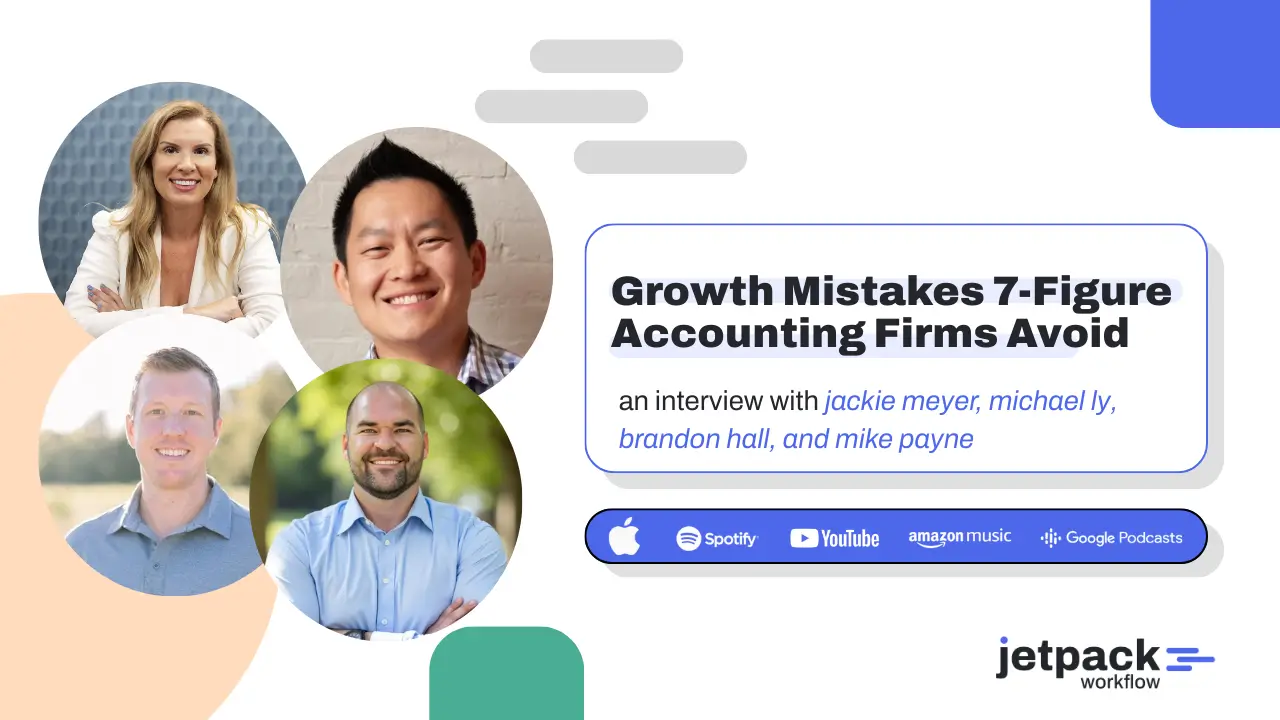
Growth Mistakes 7-Figure Accounting Firms Avoid

Scaling an accounting firm to seven figures requires avoiding a few common mistakes that slow growth. Experienced firm owners highlight three major issues: distractions during key growth periods, hiring the wrong roles too early, and failing to build a consistent sales pipeline. Firms that focus on leadership, systems, and strategic hiring are able to scale faster and with less operational stress.

Key Takeaways

  • The biggest growth mistakes accounting firm owners make are distractions, poor hiring decisions, and weak sales pipelines.

  • Successful firm owners focus on replacing themselves in operational roles and building systems that scale.

  • Consistent sales activity creates pricing power and allows firms to attract higher-value clients.

  • Clear accountability metrics and experienced hires help firms grow faster with fewer operational bottlenecks.

Jetpack Workflow Free Trial

Introduction

Scaling an accounting firm to seven figures is rarely about working more hours. The real challenge is learning which decisions accelerate growth and which ones quietly slow it down.

At a recent industry summit, several successful firm owners shared the mistakes they made while scaling their firms and the lessons they wish they had learned earlier. Their experiences highlighted a consistent theme: most growth challenges are not caused by technical skill gaps. They are caused by distractions, hiring missteps, and a lack of focus on sales and leadership systems.

These founders have built firms generating millions in revenue. Their insights provide a practical look at what actually drives sustainable growth in accounting firms.

“You have to set boundaries, and you have to say no to things.” – Dr. Jackie Meyer

Why do many accounting firms struggle to scale past early growth stages?

Many accounting firms struggle to scale because the owner remains the center of every process. Growth requires shifting from “I deliver the service” to “the firm delivers the service.

During the discussion, several founders explained that the early stages of a firm often revolve around the founder’s expertise. However, scaling requires building systems, teams, and processes that operate independently from the owner.

When the founder continues handling most of the technical work, the business eventually hits a ceiling. Client capacity, team management, and strategic decisions begin competing for the same limited time.

Successful firms grow when the owner transitions from technician to operator and strategist.

What distractions slow accounting firm growth the most?

One of the most common mistakes founders mentioned was pursuing too many opportunities at once.

As firms grow, founders receive invitations to partnerships, new ventures, speaking engagements, and product ideas. While many of these opportunities are appealing, they can easily pull attention away from the core business.

Michael Ly reflected on this mistake during one of the fastest growth periods in his firm.

“During our highest growth period, I let another business venture distract me.” – Michael Ly

Even though the opportunity was exciting, it divided leadership focus during a critical period. The result was internal mistakes, operational breakdowns, and strained client relationships.

The lesson was clear: growth periods require deep focus on the primary business.

Why is hiring strategy one of the biggest growth mistakes?

Hiring decisions often determine how quickly a firm can scale.

Many founders try to protect cash flow by hiring junior staff first. While this can reduce short-term expenses, it frequently increases the founder’s workload.

Instead of freeing up leadership time, junior hires require significant training, supervision, and review.

Brandon Hall explained that this approach delayed his firm’s growth.

“I would have hired higher-quality technical people sooner.” – Brandon Hall

Experienced professionals can take ownership of technical delivery, client relationships, and workflow management. This allows founders to spend more time on activities that actually drive firm growth.

How do successful firm owners build scalable teams?

Scaling a firm requires intentionally removing the founder from day-to-day operations.

Michael Ly described a strategy that helped his firm grow significantly: documenting every role he performed and gradually hiring specialists to replace those responsibilities.

This included:

  • Technical service delivery

  • Team management

  • HR operations

  • Sales leadership

By replacing himself in these roles over time, he shifted his focus to strategic partnerships, hiring decisions, and growth initiatives.

The goal was never to remain the best service provider in the firm. Instead, the goal was to build a firm that could deliver exceptional work without relying on the founder’s time.

Why is sales the real constraint for many accounting firms?

Many firm owners believe pricing or operational efficiency is their biggest challenge. However, the panel repeatedly emphasized that sales pipelines determine growth.

When firms consistently generate new leads, they gain leverage.

nting firms.

“If you’re scared to increase the price because you’re scared to lose clients, then you have a sales problem.” – Brandon Hall

A steady pipeline allows firms to:

  • Replace lower-value clients

  • Increase pricing confidently

  • Attract higher-quality engagements

  • Improve profitability and capacity

Several strategies were discussed for building predictable pipelines, including:

  • Consistent networking and relationship building

  • Content marketing and thought leadership

  • Outbound email outreach

  • Paid lead generation channels

  • CRM-driven sales processes

How do successful firms measure team accountability?

Growth requires clear metrics that align team performance with firm goals.

One of the simplest and most effective metrics discussed was deadline completion. Firms that track deadlines consistently tend to maintain stronger operational discipline.

Other useful accountability metrics include:

  • Client retention rates

  • Cross-selling opportunities identified

  • Revenue per employee

  • Production output by team members

These metrics help firm leaders identify bottlenecks early and ensure teams remain aligned as the firm grows.

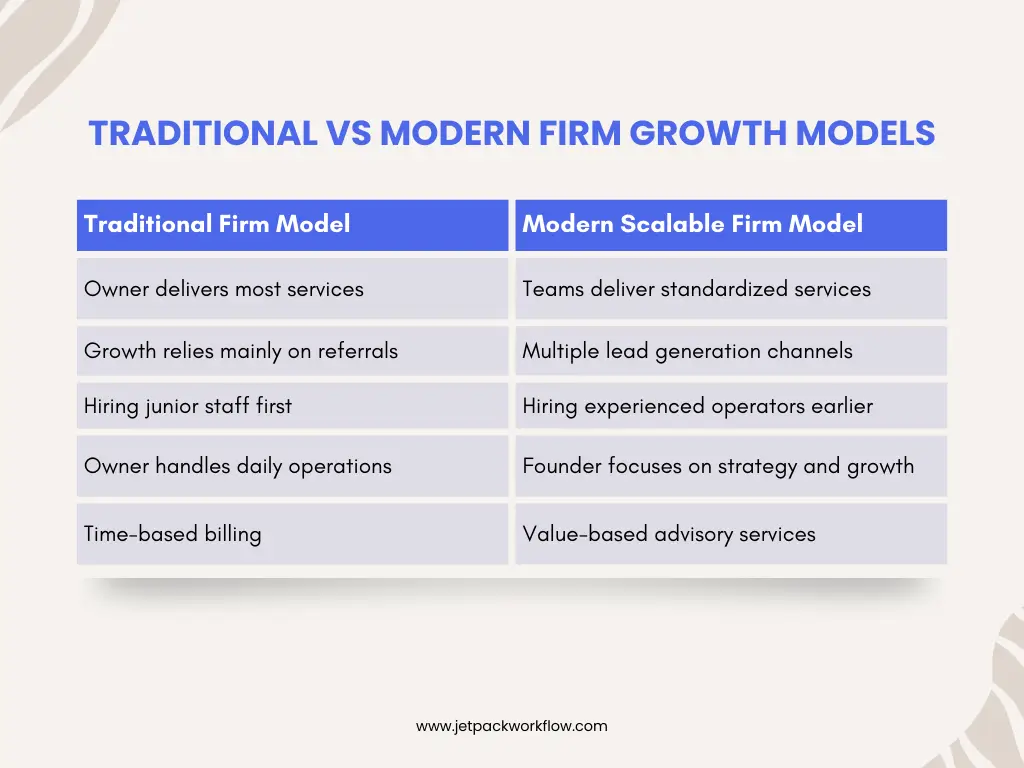
Traditional Firm vs. Simple Firm Model

The firms that reach seven figures usually adopt the modern model earlier in their growth journey.

Frequently Asked Questions

Can accounting firms realistically reach seven figures?

Yes. Many accounting firms reach seven figures by increasing revenue per client, adding advisory services, and building systems that allow teams to deliver work efficiently.

What is the biggest growth mistake accounting firm owners make?

The most common mistake is losing focus by pursuing too many opportunities at once, which divides attention during key growth periods.

Why is hiring strategy important for firm growth?

Hiring experienced professionals earlier allows founders to step away from operational work and focus on strategy, partnerships, and growth.

How do accounting firms build predictable sales pipelines?

Firms build pipelines through networking, referrals, content marketing, outbound outreach, and structured sales processes using CRM systems.

What metrics help accounting firms scale effectively?

Key metrics include deadline completion rates, client retention, cross-selling opportunities, and revenue per employee.

Should accounting firms focus on advisory services?

Advisory services can increase revenue per client and help firms move away from purely transactional work toward strategic client relationships.

Conclusion

The experiences shared by these seven-figure firm owners reveal a clear pattern. Scaling an accounting firm is not primarily about working harder or adding more clients. It is about making better leadership decisions.

Avoiding distractions, hiring strategically, building consistent sales pipelines, and replacing yourself in operational roles are the foundations of sustainable firm growth.

Firms that make these shifts early often grow faster and with less burnout.

Related Articles

Avoid Growth Bottlenecks as Your Accounting Firm Scales

Many accounting firm growth challenges come from unclear processes, weak delegation, and inconsistent workflows. Jetpack Workflow helps you standardize recurring work, track deadlines, and give your team clear visibility into every project. Build systems that support growth and keep your firm running smoothly as you scale.

See How It Works

See Jetpack Workflow In Action

Get under the hood of Jetpack Workflow’s accounting workflow and project management platform. See some of the top features and how it helps your firm standardize, automate, and track client work more efficiently.
Simplify Your Accounting Firm 5 Systems That Eliminate Bottlenecks

To simplify your accounting firm, you must narrow your services, define your ideal clients, and build systems that reduce friction. Most bottlenecks are caused by unclear processes and tool overload, not a lack of effort. When you intentionally streamline what you sell, who you serve, and how you deliver, capacity naturally increases.

Key Takeaways

  • Simplifying your accounting firm starts with narrowing what you sell and who you serve.

  • Bottlenecks are usually caused by unclear systems, not a lack of effort.

  • The right operating system reduces tech bloat and improves team capacity.

  • Roadmaps turn reactive firms into proactive advisory partners.

  • Removing friction creates capacity, and capacity creates freedom.

Jetpack Workflow Free Trial

Introduction

To simplify your accounting firm, you must intentionally reduce complexity in your services, client base, systems, and internal processes. Most bottlenecks in accounting firms are not caused by workload. They are caused by unclear positioning, scattered tools, and inconsistent delivery.

At a recent industry summit, Darren Root, author of The Simple Firm, outlined five core systems that help firms move from burnout and busyness to clarity and capacity. His central premise was direct: complexity is often self-created, and simplicity must be designed.

“Clarity and simplicity are where freedom really begins.” – Darren

If your firm feels overloaded despite strong demand, this framework offers a practical reset.

Why Do Accounting Firms Become So Complex Over Time?

Accounting firms become complex because they grow reactively. They say yes to every opportunity, layer on new tools, and add services without redefining their model.

Most firms begin with survival. Revenue comes first. Structure comes later. Over time, that creates what Darren described as a “messy closet” of services, pricing structures, and workflows.

1. Complexity Is the Result of Reactive Growth

When firms accept clients outside their expertise or add services without refining delivery systems, they accumulate friction. Teams struggle with unclear expectations. Leaders review everything. Bottlenecks form at the partner level.

“Most firms weren’t built intentionally.” – Darren

The result is a firm that generates revenue but drains energy.

Simplicity does not mean offering less value. It means offering fewer things, better.

What Should You Stop Selling to Simplify Your Accounting Firm?

You simplify your accounting firm by intentionally defining what you deliver exceptionally well and eliminating the rest.

Many firms offer audits, tax, bookkeeping, advisory, payroll, and niche services under one umbrella. But excellence requires focus.

2. A Simple Firm Only Offers What It Can Deliver Exceptionally Well Every Time

Darren shared that when he narrowed his firm to service-based businesses and then to optometry practices, revenue did not shrink. It doubled. Focus improved delivery, clarity, and profitability.

Packaging and pricing also play a major role. Bundled services with defined outcomes eliminate ambiguity for both clients and staff.

Ask:

  • What services are we truly world-class at?

  • Which services consistently create bottlenecks?

  • What would happen if we eliminated the bottom 20%?

Clarity in your “what” reduces downstream friction across every workflow.

How Do You Identify the Right Clients to Eliminate Bottlenecks?

You eliminate bottlenecks by defining and enforcing a clear Ideal Client Profile.

When every client fits your ICP, delivery becomes repeatable. When clients vary wildly, systems break down.

3. Simplifying Who You Serve Makes Everything Else Easier

Darren emphasized the goal of reaching 100 percent ICP alignment. That means:

  • Industry focus

  • Revenue range clarity

  • Defined service scope

  • Shared communication expectations

When your client base is aligned, your tech stack, pricing, staffing, and workflows naturally become simpler.

Without that alignment, friction multiplies. The wrong clients create review bottlenecks, scope creep, and communication breakdowns.

This is especially important in what Darren described as the “Golden Age of Accounting,” where demand exceeds supply. Firms now have the leverage to choose.

How Should You Design Your Firm’s Operating System?

You simplify your accounting firm by separating production tools from your firm operating system and minimizing tool sprawl.

Many firms do not struggle with tax software or bookkeeping platforms. They struggle with workflow, portals, billing tools, communication systems, and overlapping apps.

4. Consistency Is the Backbone of Client Experience and Team Sanity

Darren noted that the goal is to use the minimum number of tools required to deliver a world-class experience.

This requires asking:

  • What experience are we trying to create?

  • Which tools directly support that outcome?

  • Which tools are redundant or rarely used?

Technology bloat creates hidden friction. Every new login, every duplicate portal, and every disconnected app adds cognitive load to your team.

A streamlined operating system increases visibility, accountability, and capacity.

What Role Do Roadmaps Play in Simplifying an Accounting Firm?

Roadmaps transform a reactive firm into a proactive advisory firm.

Rather than responding to issues as they arise, a roadmap defines the complete service pathway for an ideal client type.

5. Roadmaps Turn a Firm From Reactive to Transformational

Darren suggested using structured planning to identify the top tax and business planning strategies for a specific client profile. From there, you identify gaps between what the client is currently doing and what they should be doing.

That gap becomes your advisory opportunity.

Instead of waiting for client questions, you guide the journey.

Roadmaps:

  • Standardize advisory delivery

  • Create upsell clarity

  • Reduce uncertainty

  • Improve team coordination

They eliminate the blank page problem and replace it with structured execution.

How Do You Remove Friction and Increase Capacity?

You remove friction by identifying bottlenecks in processes, technology, and expectations, then addressing them quarterly.

Bottlenecks are friction. Darren confirmed this directly: yes, bottlenecks are a form of friction.

Often, the partner becomes the bottleneck because everything funnels upward.

Friction typically appears in three places:

  • Processes

  • Technology

  • Client expectations

For example, if clients inconsistently submit documents, the problem may not be compliance. It may be unclear expectations.

“When you remove friction, you start creating capacity. And capacity leads to freedom.” – Darren

Capacity creates:

  • Time freedom

  • Financial leverage

  • Better hiring decisions

  • Clearer purpose

Simplification is not about working less. It is about removing what slows the firm down.

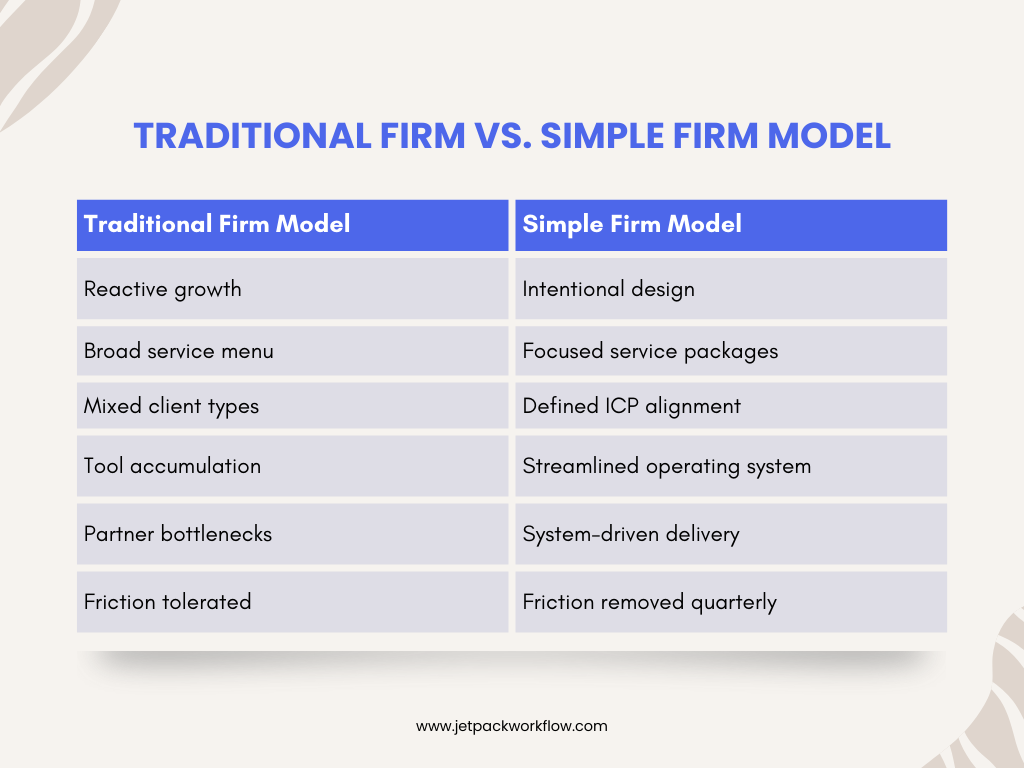
Traditional Firm vs. Simple Firm Model

Traditional Firm vs. Simple Firm Model

This shift is strategic, not cosmetic.

Conclusion

If you want to simplify your accounting firm, start by redefining what you sell, who you serve, and how you deliver. Bottlenecks are not signs of failure. They are signals of misalignment.

Simplicity is strategic. It requires saying no. It requires system design. And it requires removing friction consistently.

When you build systems that eliminate bottlenecks, you create capacity. And capacity gives you options.

If you are evaluating your firm’s operating system, client workflows, or recurring task visibility, consider whether your current systems are helping reduce friction or adding to it. The right workflow foundation can support the clarity this framework demands.

Frequently Asked Questions

How do I simplify my accounting firm without losing revenue?

You simplify by narrowing services and ideal clients, not by reducing value. Focus often increases profitability because delivery becomes more efficient and pricing becomes clearer.

What causes bottlenecks in accounting firms?

Bottlenecks are usually caused by unclear systems, partner review overload, tech sprawl, or inconsistent client expectations.

How often should firms review internal friction?

Quarterly reviews are recommended to identify process inefficiencies, technology overlap, and communication breakdowns.

What is an Ideal Client Profile in accounting?

An Ideal Client Profile defines the specific industry, size, service needs, and behavioral traits that align with your firm’s delivery model.

Does simplifying mean using fewer tools?

Not necessarily fewer tools, but fewer redundant tools. The goal is to use the minimum number required to deliver a consistent, high-quality experience.

How do roadmaps improve advisory services?

Roadmaps define the full planning framework for a client type, making advisory proactive instead of reactive.

Can small firms implement this framework?

Yes. In fact, smaller firms often benefit most because they can pivot faster and eliminate complexity earlier.

Related Articles

Eliminate Bottlenecks and Simplify Your Accounting Firm

Most accounting firm bottlenecks come from unclear processes and scattered workflows. Jetpack Workflow helps you standardize recurring tasks, improve visibility, and reduce friction across your team. Create capacity and simplify operations without hiring more staff.

See How It Works

See Jetpack Workflow In Action

Get under the hood of Jetpack Workflow’s accounting workflow and project management platform. See some of the top features and how it helps your firm standardize, automate, and track client work more efficiently.
Workflow Software for Firm-Wide Deadline Visibility

Accounting firms operate on deadlines. Tax filings, monthly closes, payroll runs, compliance submissions, and advisory deliverables all depend on precise coordination. When deadlines are not clearly visible, work piles up. When capacity is not balanced, teams burn out.

Deadline and capacity planning are operational foundations. The right workflow software helps firms see all due dates across clients, understand team workload, and identify bottlenecks before they impact delivery.

This guide compares leading accounting workflow software platforms with a focus on deadline visibility and capacity planning.

Key Takeaways

  • Deadline visibility across all clients is critical for accounting firms.

  • Capacity planning reduces burnout and uneven workloads.

  • Not all workflow tools are designed for recurring accounting deadlines.

  • The best platform depends on whether structure or flexibility is the priority.

Jetpack Workflow Free Trial

How We Evaluated Deadline and Capacity Planning Software

We evaluated each platform based on its ability to:

  • Provide firm-wide visibility into deadlines

  • Highlight overdue and upcoming work

  • Show workload by team member

  • Support recurring deadline structures

  • Help leadership identify bottlenecks

  • Scale across multiple clients and service lines

Comparing the Leading Accounting Workflow Platforms

Jetpack Workflow

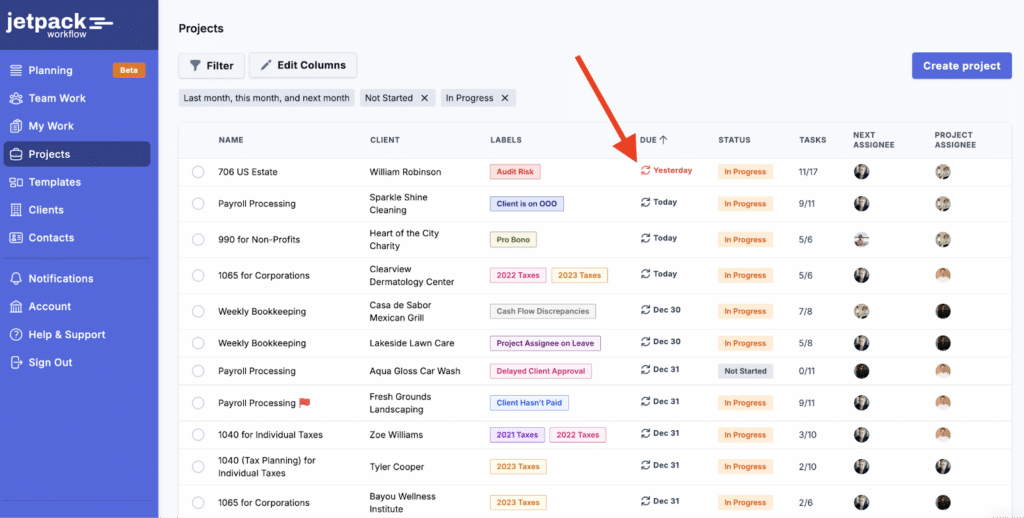
Best Workflow Software for Accounting Firms | Jetpack Workflow

Best for: Structured deadline visibility and firm-wide capacity clarity

Jetpack Workflow is purpose-built for accounting firms and focuses heavily on recurring deadlines and workload transparency. Its core strength is making all client work visible in one centralized view.

Strengths for Deadline and Capacity Planning

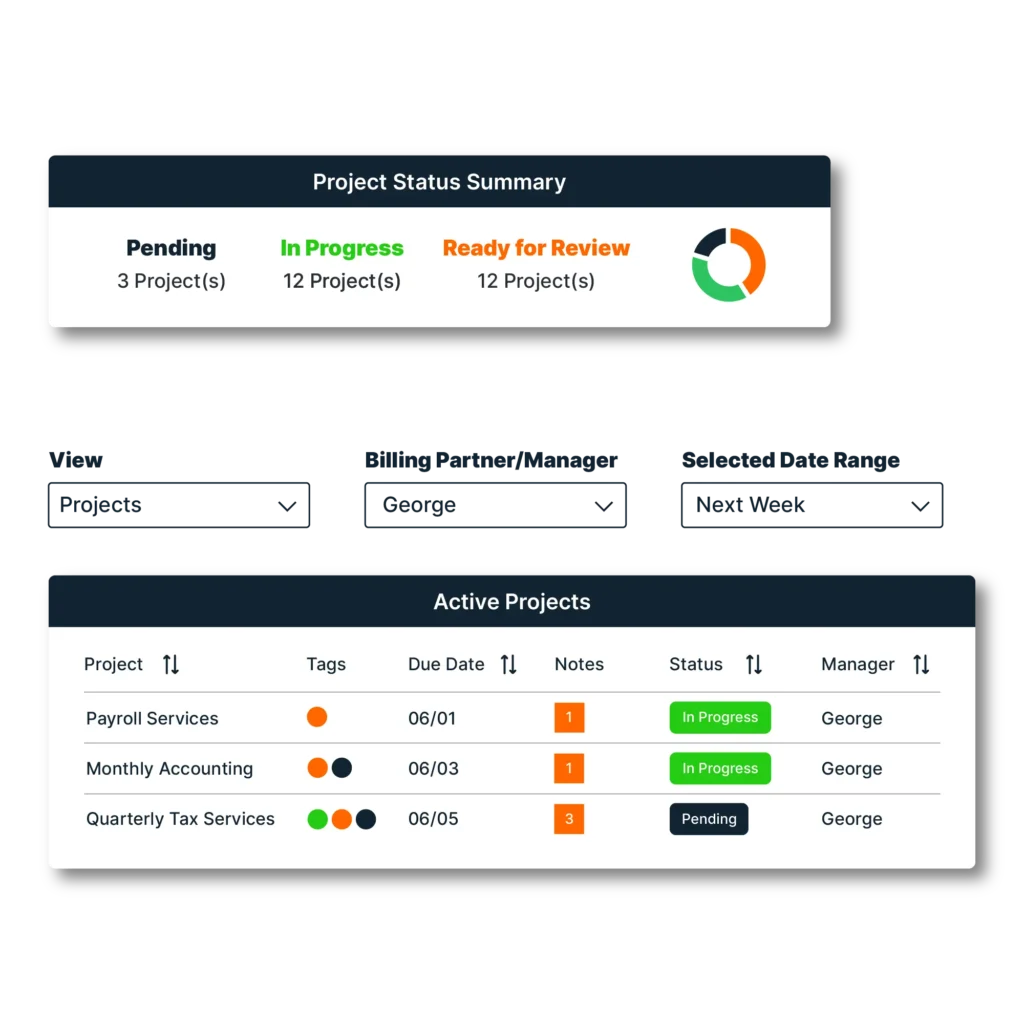
  • Firm-wide dashboard of all deadlines

  • Clear overdue and upcoming work visibility

  • Workload view by team member

  • Designed specifically for recurring accounting deadlines

  • Structured workflow templates that standardize delivery

  • Easy identification of bottlenecks before deadlines are missed

Jetpack stands out because deadline management is not an add-on feature. It is central to the system’s design. For firms that prioritize never missing a client deadline, this structured visibility provides a measurable operational advantage.

Trade-Offs

  • Not a general-purpose project management tool

  • Focused specifically on accounting workflows rather than broad industries

Ideal Firm Type

  • Accounting firms managing recurring tax, bookkeeping, payroll, or advisory deadlines

  • Firms seeking predictable deadline control

  • Leadership teams needing immediate visibility into capacity

Uku

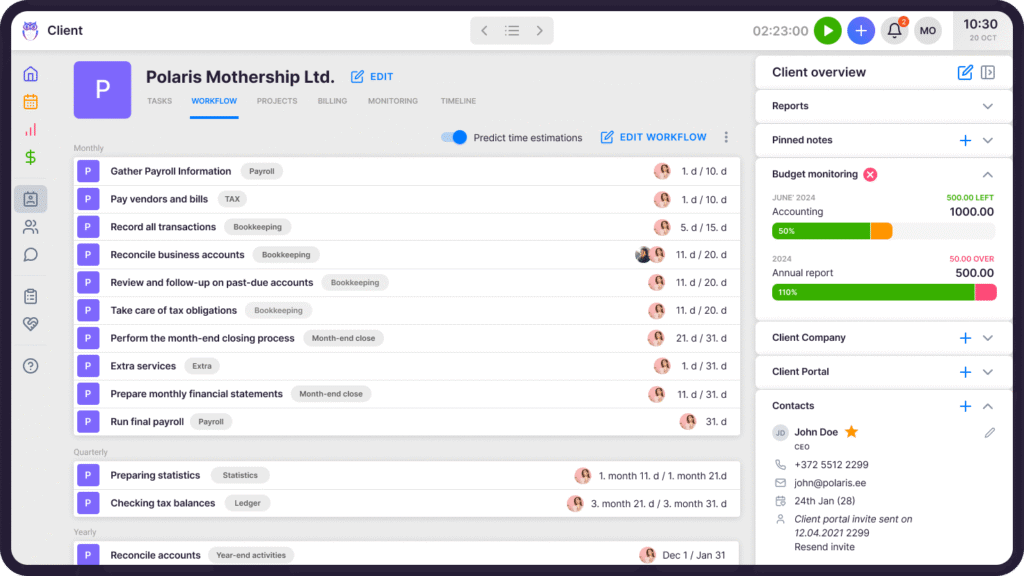
Uku-CRM-Client-workflow

Best for: Accounting-specific workflow standardization

Uku is built for accounting firms and supports structured workflow management with template-based processes.

Strengths for Deadline and Capacity Planning

  • Structured accounting workflows

  • Task-level visibility

  • Template-based recurring work

Trade-Offs

  • Capacity visibility may require more interpretation at the leadership level

  • Less emphasis on firm-wide dashboard clarity compared to systems designed primarily around deadlines

Ideal Firm Type

  • Firms prioritizing standardized accounting workflows

  • Teams that value structured templates

Mango Practice Software

Mango Practice Software

Best for: All-in-one practice management

Mango combines workflow, billing, CRM, and document management into one platform.

Strengths for Deadline and Capacity Planning

  • Integrated client and billing management

  • Project tracking within a broader practice suite

  • Centralized operational visibility

Trade-Offs

  • Workflow and deadline tracking are part of a larger system rather than the core focus

  • Less specialized for recurring deadline-heavy environments

Ideal Firm Type

  • Firms wanting a unified operational system

  • Practices prioritizing integration over workflow specialization

Smartsheet

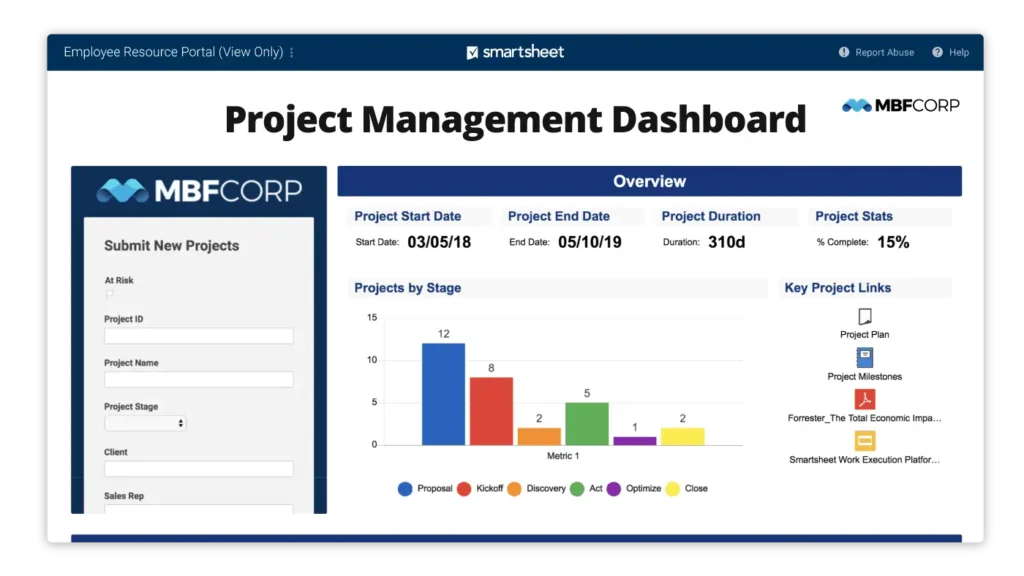
smartsheet dashboard

Best for: Custom capacity dashboards and reporting

Smartsheet is a flexible project and work management platform used across many industries.

Strengths for Deadline and Capacity Planning

  • Highly customizable dashboards

  • Advanced reporting tools

  • Strong visualization capabilities

Trade-Offs

  • Not accounting-specific

  • Requires setup and ongoing configuration

  • Recurring accounting workflows must be built manually

Ideal Firm Type

  • Firms with internal process design expertise

  • Teams requiring advanced customization

ClickUp

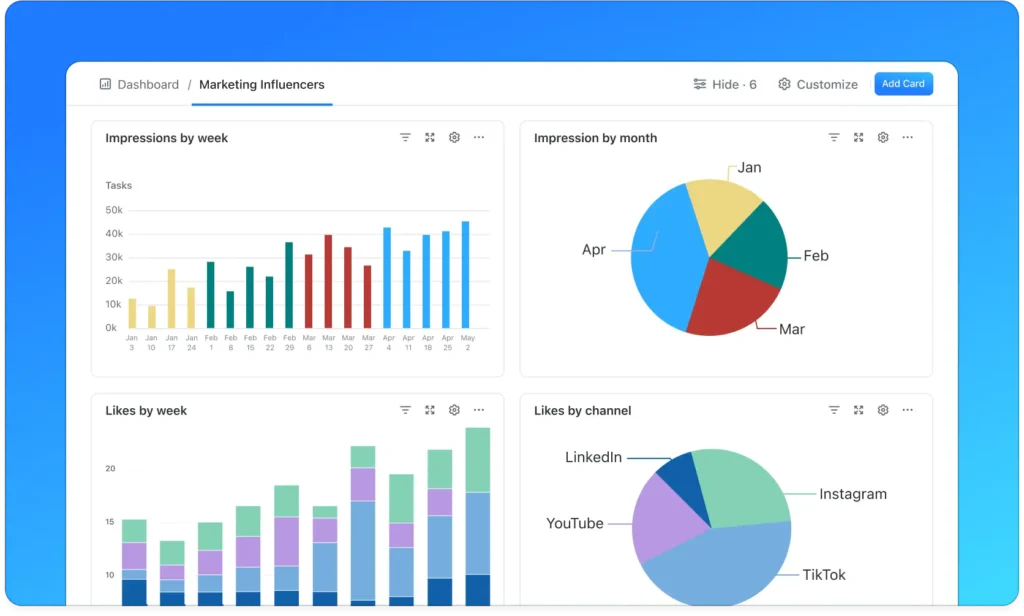
ClickUp Dashboard

Best for: Flexible task and project management

ClickUp is a general-purpose task management platform with extensive customization options.

Strengths for Deadline and Capacity Planning

  • Custom views and dashboards

  • Flexible task structures

  • Wide integration ecosystem

Trade-Offs

  • Not designed specifically for accounting firms

  • Recurring deadline workflows must be configured

  • Capacity visibility depends heavily on setup quality

Ideal Firm Type

  • Firms comfortable building their own workflow structure

  • Teams already using ClickUp for broader operations

Quick Comparison Overview

  • Jetpack Workflow: Strongest for structured recurring deadlines and firm-wide capacity clarity

  • Uku: Accounting-focused workflow templates

  • Mango Practice Software: Broad practice management coverage

  • Smartsheet: Advanced custom reporting and dashboards

  • ClickUp: Flexible, configurable task management

Which Tool Is Best for Your Firm?

If missed deadlines are your biggest risk

Jetpack Workflow provides the clearest recurring deadline visibility.

If you need highly customizable dashboards

Smartsheet or ClickUp may offer greater flexibility.

If you want an all-in-one operational system

Mango Practice Software may be suitable.

If you want accounting-specific workflow templates

Uku offers structured accounting workflows.

Conclusion

Deadline and capacity planning are critical for maintaining client trust and team performance. While many tools offer task management, not all are designed to manage recurring accounting deadlines at scale.

For firms that prioritize structured visibility, recurring deadline control, and clear workload distribution, Jetpack Workflow stands out as the strongest option in this comparison.

Frequently Asked Questions

What is deadline and capacity planning in accounting firms?

Deadline planning refers to organizing and tracking all recurring and one-time client due dates across the firm. Capacity planning involves understanding how work is distributed across team members to ensure deadlines are met without overloading staff.

Why do accounting firms struggle with deadline management?

Many firms rely on spreadsheets, email reminders, or disconnected tools. Without centralized visibility, deadlines become dependent on individual memory rather than structured systems, increasing the risk of missed work.

How does workflow software improve capacity planning?

Workflow software shows workload by team member, highlights overdue tasks, and provides visibility into upcoming deadlines. This helps leadership redistribute work before bottlenecks develop.

Can general project management tools handle accounting deadlines?

General project management tools can track tasks, but they are not always optimized for recurring accounting workflows. Accounting-specific systems are typically better structured for managing repeatable compliance, bookkeeping, and advisory deadlines.

What features matter most for deadline and capacity planning software?

Key features include recurring task automation, firm-wide deadline dashboards, workload visibility by team member, standardized workflow templates, and clear overdue alerts.

Related Articles

Take Control of Every Accounting Deadline

Managing recurring deadlines and balancing team capacity should not rely on spreadsheets. See how workflow software built for accounting firms brings visibility, structure, and accountability to every client engagement.

FREE TRIAL

Written by Jetpack Workflow, drawing on experience in accounting workflow systems, recurring deadline control, and capacity planning for growing firms. This content is grounded in real-world accounting operations designed to improve visibility, accountability, and scalability.

See Jetpack Workflow In Action

Get under the hood of Jetpack Workflow’s accounting workflow and project management platform. See some of the top features and how it helps your firm standardize, automate, and track client work more efficiently.