Free General Ledger Template (Excel & Google Sheets)
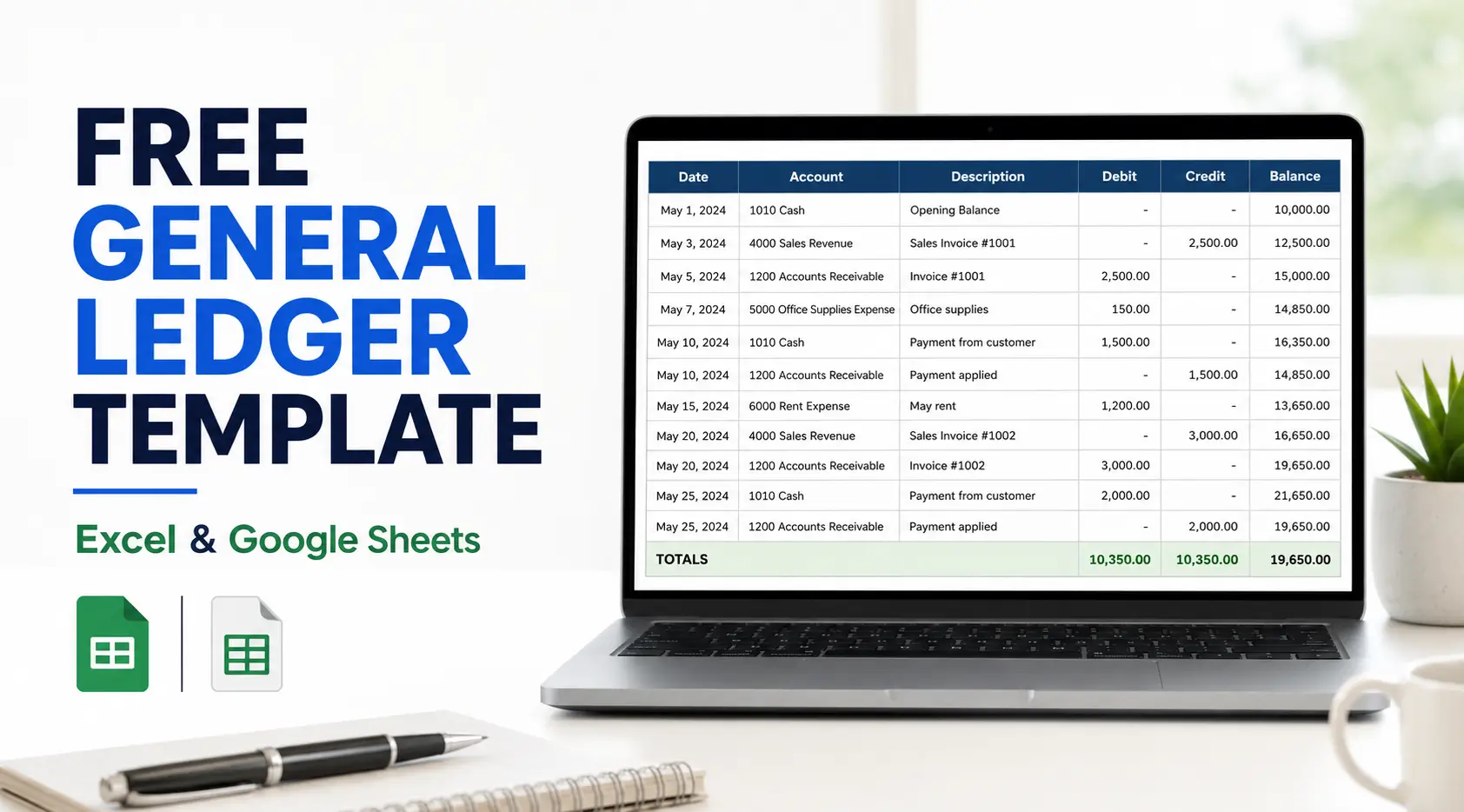
Download This Editable General Ledger Template
To help you get started quickly, we have included a downloadable template in multiple formats:Free — no email required: open the Google Sheets version and make your own copy.
Enter your email and we will send the General Ledger Template (Excel) plus 32 free accounting workflow templates straight to your inbox.
Your files are ready:
Want these deadlines tracked automatically for every client? Start a free 14-day trial of Jetpack Workflow.
Why Use a General Ledger
The general ledger is often called the backbone of accounting. It summarizes all journal entries and organizes them into accounts for assets, liabilities, equity, revenue, and expenses. Using a pre-built template saves time and ensures accuracy and helps with:- Consolidation of data: All transactions live in one place.
- Error detection: Easier to identify mistakes when accounts do not balance.
- Historical record: Keeps an ongoing financial story of your business.
- Decision support: Helps analyze cash flow and profitability.
How to Create a General Ledger
Using the template is straightforward, but there are some best practices to follow for accuracy. Here are the main steps.Step 1: Download the Template
Start by downloading the general ledger template for Excel or opening the Google Sheets version. This provides the structure for recording your accounts and transactions.Step 2: Customize the Chart of Accounts
Before entering data, adjust the chart of accounts so it reflects your business. Include categories for assets, liabilities, equity, revenue, and expenses. This step is essential for creating a detailed general ledger.Step 3: Choose an Accounting Method
Decide whether to use cash or accrual accounting. Cash records transactions when money moves in or out. Accrual recognizes income and expenses when they are incurred. The method you select will determine how you enter data in the ledger.Step 4: Enter Financial Data
For each transaction, include the date, description, account, debit, and credit. The general ledger spreadsheet is set up so you can easily input this information. Always check that total debits equal total credits.Step 5: Review and Reconcile
At the end of each period, reconcile the ledger with bank statements and other records. This ensures your books are accurate and complete. If discrepancies appear, return to the journal entries and adjust as needed.Example: Using the Ledger
Imagine a business earns $10,000 in service income and spends $3,000 on supplies. Here’s how it looks in the ledger:- Cash Account: Debit $10,000
- Service Revenue Account: Credit $10,000
- Supplies Expense Account: Debit $3,000
- Cash Account: Credit $3,000
What Is Included in the General Ledger Template?
Explain the spreadsheet columns:
- Transaction date
- Account name and number
- Transaction description
- Reference number
- Debit amount
- Credit amount
- Running account balance
A simple table explaining each field would improve usability and keyword coverage.
General Ledger Example for a Small Business
Add a completed example showing how cash sales, expenses, invoices, and owner contributions appear as debits and credits. Include a screenshot or preview of the completed spreadsheet.
General Ledger vs. Journal vs. Trial Balance
Add a short comparison table explaining:
- A journal records transactions chronologically.
- A general ledger organizes transactions by account.
- A trial balance checks whether total debits and credits agree.
Common General Ledger Mistakes to Avoid
Cover practical issues such as:
- Recording only one side of a transaction
- Using the wrong account
- Forgetting reference numbers
- Failing to reconcile balances
- Mixing personal and business transactions
- Leaving adjusting entries until year-end
Tips for Using Jetpack Workflow’s General Ledger Accounting Template
Here are some additional suggestions for maximizing the template:- Keep entries consistent: Use the same format for descriptions to make reviewing easier.
- Number transactions: Adding reference numbers helps link entries back to invoices or receipts.
- Review regularly: Don’t wait until the end of the year to reconcile accounts. Monthly reviews prevent errors from compounding.
- Protect the file: Save a copy of your general ledger form in cloud storage or export it as a PDF for backup.
- Use for analysis. Over time, the ledger provides insight into spending patterns and profitability.
More free templates for accounting and bookkeeping firms
- Accounts payable template
- Bookkeeping invoice template
- Bookkeeping engagement letter template
- Bookkeeping proposal template
- New client intake form for accounting firms
- Bookkeeping client onboarding questionnaire
- Accounting task spreadsheet
- Accounting memo template
- Bookkeeping client folder template
Need Help Managing New Client Projects?
A workflow management system is a great way to keep your bookkeeping firm organized and running efficiently. By automating tasks and keeping track of deadlines, you can be sure that nothing falls through the cracks and your clients are always getting the best possible service. In addition, a workflow management system can help you to allocate resources more effectively, ensuring your staff is always working on the most important tasks. Ultimately, a workflow management system can save you time and money, making it an essential tool for any bookkeeping firm. Jetpack Workflow was designed from the ground up with bookkeepers and accountants in mind. The cloud-based workflow management system allows you to start with predefined templates, customize them for your firm, and track progress on all your work. Jetpack Workflow offers a free 14-day trial which will give you the opportunity to see how much time you could be saving with a full workflow management system.If you are producing this for several clients each month, the harder problem is not the template — it is tracking which clients are done and which are not. That is what Jetpack Workflow does: recurring checklists, deadlines, and a view of who is behind. Plans start at $40/user/month with a 14-day free trial.
Final Thoughts
A general ledger template simplifies one of the most important aspects of accounting. With a clear record of debits and credits, you’ll always know where your business stands. Try the free template today and explore other accounting tools from Jetpack Workflow to make financial management easier.Share this article