How to Build AI Agents for Accounting Firms: Isaac Perdomo’s Three-Step Framework
Isaac Perdomo‘s framework for building AI agents has three stages: connect, build, and automate. First, connect AI to the approved systems that contain work, instructions, communications, financial data, and client context. Next, build a narrow agent around one useful outcome. Finally, automate the trigger while limiting permissions and preserving human review. His live examples included an internal knowledge assistant, an SOP gap analyzer, a daily inbox triage agent, and a client onboarding handoff process.
Key Takeaways
- AI is only as useful as the relevant systems and data it can access.
- Connect work management, SOPs, email, meeting notes, accounting data, CRM records, and file storage selectively.
- Start with an agent that solves one visible problem for the team.
- Build adoption into the workflow instead of expecting employees to remember another tool.
- Scheduled agents are useful, but event-triggered agents can act at the exact point a process changes.
- Limit connectors, actions, and write permissions before an agent runs without supervision.
- Use workflow software to keep the trigger, owner, deadline, review, and completion status visible.
- Accounting firms do not need another list of impressive things AI might do someday. They need a practical way to decide what to connect, what to build, and how to run it safely.
That was the focus of Isaac Perdomo’s workshop at Jetpack Workflow’s Growing Your Firm AI + Tech Summit. Perdomo, founder of Opzer, has helped more than 100 accounting firms improve operations through automation and system integration.
His framework was direct: Connect, Build, Automate.
The order matters. An agent cannot complete useful firm work if it cannot access the right information. Connecting every system without a defined job, however, creates risk and confusion. Automation should come only after the firm has tested the task and confirmed the controls.
What Is an AI Agent for an Accounting Firm?
An AI agent is a system that can work toward a defined outcome by following instructions, using approved tools, and completing multiple steps. Depending on its setup, an agent may retrieve information, analyze files, prepare drafts, create records, or trigger another process.
For an accounting firm, an agent might:
- Answer an employee’s question using approved SOPs
- Review a knowledge base for missing procedures
- Triage an inbox and draft replies
- Prepare a client onboarding brief after a proposal is signed
- Review a general ledger and flag unusual items
- Create recurring client work in a workflow platform
- Organize meeting notes and surface client concerns
The agent is not the workflow itself. The workflow includes the event that starts the work, the data used, the person or system responsible, the review step, the deadline, and the record of completion.
Step One: Connect AI to the Right Firm Systems
Perdomo’s core point was simple: AI is only as powerful as what the firm connects to it.
He compared an unconnected AI tool to hiring a brilliant employee and refusing to give that person access to the systems needed for the job. The employee may know a great deal, but cannot see the work, the firm’s procedures, or the relevant client information.
Perdomo identified seven high-value connection points.
1. Work Management
Work management is where the firm tracks jobs, tasks, owners, and deadlines. For Jetpack Workflow users, this includes recurring client work and the steps required to complete it.
Connecting an agent to work management can support questions and actions such as:
- Which jobs are overdue?
- Which tasks have been blocked for more than a week?
- What recurring work must be created for a new client?
- Which tasks could an agent prepare for human review?
- Where is the team overloaded?
Jetpack Workflow can connect with Zapier, and current Zapier listings include actions that can expose approved Jetpack capabilities to AI tools. The exact trigger and action set should be checked before implementation.
2. Knowledge Base and SOPs
A knowledge base explains how the firm works. It may live in Notion, Google Drive, SharePoint, or another documentation platform.
When AI can search approved SOPs, it can answer process questions, identify contradictions, suggest missing documentation, and find the instructions related to a task.
The connection must be curated. Archived, obsolete, and draft documents should be separated or clearly labeled. Otherwise, the agent may cite a procedure the firm no longer follows.
3. Email
Email contains requests, approvals, deadlines, commitments, and unresolved client issues. An agent can help summarize recent messages, prioritize items that need a response, and prepare drafts.
Email is also a high-risk connection because it allows the agent to see sensitive information and potentially communicate externally. A safer first version should read approved messages and create drafts while leaving the final send action to a person.
4. Meetings and Transcripts
Meeting notes provide context that is often missing from a task description. They can reveal client sentiment, decisions, new commitments, and concerns that need follow-up.
An agent might review transcripts to prepare for the next meeting, identify promised actions, or surface positive feedback that could become a testimonial after the client grants permission.
5. Accounting and Financial Data
Connecting accounting data can support first-pass general ledger review, journal entry preparation, reporting, and data transformation.
Perdomo emphasized that example inputs and outputs matter. If the firm can show the agent a payroll report and the correct journal entry created from it, the agent has a stronger basis for learning the mapping than if it receives only a vague instruction.
Human review remains necessary. An agent may draft or flag, but a qualified accountant should validate the entry, period, accounts, calculations, and supporting evidence.
6. CRM and Client Records
The CRM or client database contains core information about the relationship, services, contacts, and engagement status. Connecting it can help the agent prepare handoffs, keep records consistent, and bring relevant client context into a workflow.
7. File Storage
File storage gives the agent access to source documents, templates, workpapers, and deliverables. Permissions should follow the employee’s existing access wherever possible, and the agent should not receive broader visibility than the person responsible for the work.
Control Access Before Building Anything
Perdomo recommended configuring organization-level connector permissions before inviting the entire team to experiment.
For each connection, the firm should decide:
- Which users may access it?
- Which data can the agent read?
- Which actions can it take?
- Which actions require manual approval?
- Which actions should be disabled?
- What activity is logged?
- How can access be revoked?
The ability to send a message, create a financial record, move a file, or update a client should not be enabled simply because it is available.
This is the principle of least privilege. Give the agent the minimum access needed to complete the approved task.
Step Two: Build Narrow Agents Around Real Firm Problems
Perdomo demonstrated three levels of agent building, plus an additional documentation use case. Each one addressed a problem that accounting firms already recognize.
Agent One: An Internal Knowledge Assistant
The first example connected Claude to Opzer’s Notion knowledge base. Team members could ask questions such as, “How should I start my day?” The assistant searched approved documentation and returned the relevant routine.
This is a practical first agent because it reduces time spent searching for an SOP or asking a manager to repeat an answer.
To make it reliable, the firm should:
- Identify the approved knowledge base.
- Separate archived and draft material.
- Confirm document owners and review dates.
- Require the assistant to cite or link to its source.
- Provide an escalation path when the documentation does not answer the question.
The goal is not to replace the SOP library with a chatbot. The agent should make the library easier to use.
Agent Two: An SOP Gap Analyzer
Perdomo then showed an agent that reviewed the knowledge base and identified missing or weak documentation. It categorized existing resources, highlighted gaps, and recommended which procedures should be documented next.
This can help firms move beyond vague goals such as “we need better SOPs.” The output can become a prioritized documentation backlog based on business impact, risk, and frequency.
A useful gap analysis should look for:
- Core services with no documented process
- SOPs that have not been reviewed recently
- Contradictory steps across documents
- Processes with no owner
- Processes that do not define completion
- Workflows with no exception handling
- Instructions that are too vague for a new employee to follow
Jetpack Workflow’s accounting policies and procedures template can help firms create a consistent structure for the missing procedures.
Agent Three: A Daily Inbox Triage Assistant
The next example used a scheduled task to review recent email, prioritize the messages that needed attention, identify items waiting on others, and draft replies.
This demonstrates an important adoption principle. An agent that works only when someone remembers to open it may not become part of the firm. A scheduled agent can prepare the information before the workday begins.
The safest first version should:
- Summarize instead of deleting messages
- Draft replies instead of sending them
- Ignore folders or labels outside its scope
- Avoid making commitments on the user’s behalf
- Surface uncertainty rather than guessing
- Keep the user responsible for final decisions
Cowork scheduled tasks may depend on the desktop environment and the computer being available, depending on the current product behavior. Firms should verify the latest requirements in Anthropic’s Claude app release notes.
Agent Four: A Client Onboarding Handoff Process
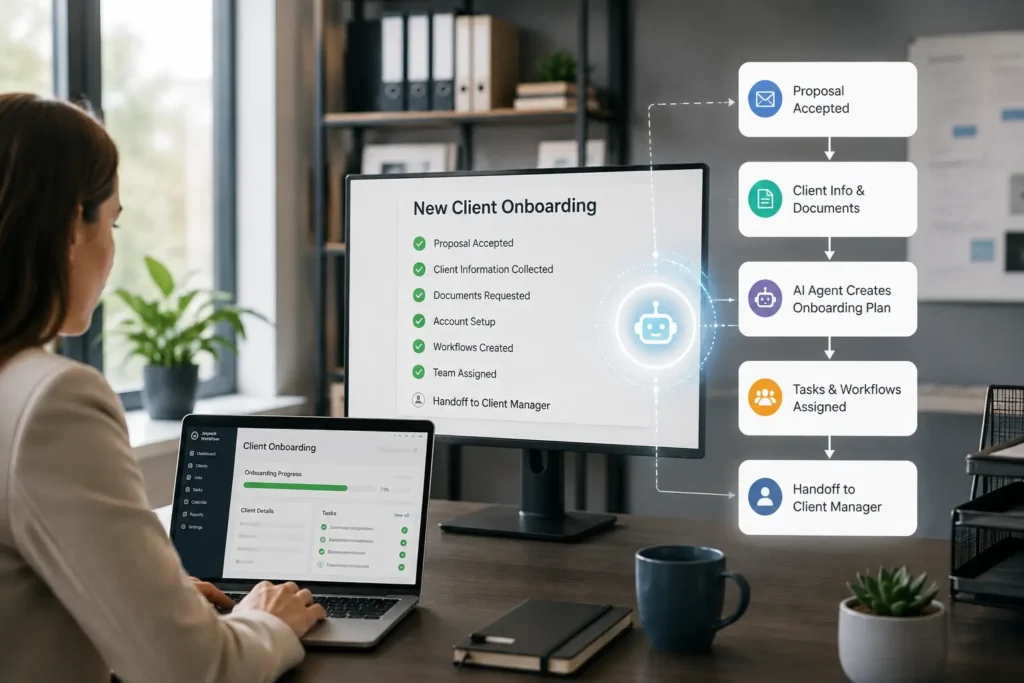
Perdomo’s most advanced example created a client handoff after an onboarding event. The agent gathered approved information from meetings and connected systems, summarized goals and services, and prepared a document for the delivery team.
The business problem is common. Sales learns important details during discovery, but the delivery team receives only a name, an engagement letter, and a short note. Context gets lost, and the client repeats information during kickoff.
A controlled onboarding agent can prepare:
- Client and contact information
- Services purchased
- Key goals and deadlines
- Operational concerns discussed during discovery
- Decisions and commitments already made
- Required kickoff documents
- Open questions for the delivery team
- Initial jobs and tasks to create
This is where Jetpack Workflow can provide the operational backbone. A signed proposal or completed onboarding form can trigger a new client record and the appropriate workflow template through an approved automation. The team can then see every onboarding task, owner, and deadline in one place.
Step Three: Automate the Trigger Safely
An agent becomes more useful when it begins at the right moment without someone manually copying information into it.
Perdomo separated three levels of operation:
- Chat: a person opens the tool and asks for help.
- Scheduled work: the agent runs at a defined time.
- Event-triggered work: the agent runs when something happens, such as a signed proposal, submitted form, completed task, or new client record.
Anthropic’s current routines documentation describes scheduled and event-driven patterns for unattended work. Zapier also provides an MCP connection layer that can expose approved actions across business applications.
The more autonomous the trigger, the more important the controls become.
Before allowing an agent to run unattended, confirm:
- The trigger is specific and reliable.
- The agent receives only the data required.
- Unneeded connectors are removed.
- External communication requires approval.
- Financial write actions require review.
- The agent stops when information is missing.
- Errors create an alert instead of disappearing.
- The firm can see what happened and rerun the process safely.
A Simple Build Plan for Your First Accounting Agent
Step 1: Choose a Process With a Clear Outcome
Start with one of the following:
- Answering questions from approved SOPs
- Preparing a daily inbox summary
- Creating a draft client handoff
- Reviewing a recurring report for missing items
- Creating standard onboarding jobs after a new client is added
Step 2: Map the Human Workflow
Write down the trigger, inputs, steps, decisions, output, reviewer, deadline, and exception path. If the team cannot explain these items, the process is not ready for automation.
Step 3: Decide What the Agent Can Read and Do
List the required systems and the minimum permissions. Separate read access from write access. Begin with read and draft capabilities whenever possible.
Step 4: Build the Manual Version First
Run the agent on demand using sample or redacted data. Compare the result with the work of an experienced employee. Record every failure and unclear assumption.
Step 5: Add the Review Gate
Choose the person responsible for approval. Define what they must check and what happens when the agent is wrong.
Step 6: Add a Schedule or Event Trigger
Only after the process works consistently should the firm automate when it runs. Start with a small client group or internal use case.
Step 7: Track the Process in Workflow Software
Create or update the related workflow in Jetpack Workflow. Track whether the input arrived, whether the agent completed its step, whether review is pending, and whether the client deadline is safe.
Step 8: Measure the Result
Track more than time saved. Measure:
- Adoption by the team
- Review corrections required
- Errors prevented
- Turnaround time
- Client response time
- Work completed on schedule
- Exceptions that required escalation
Why AI Agents Still Need Accounting Workflow Software
An agent can prepare a handoff document, but it does not automatically give the firm a complete view of client work. It can draft a reply, but it does not decide whether the related tax deadline is at risk. It can review a ledger, but the firm still needs to know who approves the review and whether the job is complete.
Workflow software provides the control layer around AI-assisted work:
- Recurring schedules
- Standardized templates
- Assigned owners
- Due dates
- Status visibility
- Review steps
- Team accountability
- Client-level organization
This is why firms should organize workflows before trying to automate everything. AI can help execute parts of the process. Jetpack Workflow helps the firm manage the process as a whole.
Learn more about how workflow systems help accounting firms become AI-ready or start a 14-day free trial to turn recurring client work into visible, trackable workflows.
Frequently Asked Questions
What is the best first AI agent for an accounting firm?
The best first agent solves a narrow, repetitive problem with low risk. An internal SOP assistant, daily inbox summary, meeting-preparation assistant, or draft onboarding handoff is usually easier to test than an agent that changes financial records.
What systems should an accounting firm connect to AI?
Common connection points include work management, the SOP knowledge base, email, meeting transcripts, accounting data, CRM records, and file storage. Connect only the systems required for the approved use case.
Can an AI agent create jobs in Jetpack Workflow?
Jetpack Workflow can connect with automation platforms such as Zapier. Available triggers and actions may allow approved systems or AI tools to create client records or jobs. Firms should confirm the current integration capabilities and permissions before rollout.
Should an accounting AI agent be allowed to send emails or post entries?
Not by default. A safer starting point is to let the agent create drafts or recommendations. External messages and financial write actions should require human approval until the firm has completed testing, security review, and governance.
How do accounting firms keep AI agents from using outdated SOPs?
Maintain an approved knowledge base, separate archived material, assign document owners, include review dates, and require the agent to cite the source it used. The firm should also review SOPs and AI instructions whenever a process changes.
Related Articles
- Ira Rosenbloom on Accounting Firm Succession Planning: Build a Profitable Firm That Lasts
- Selling an Accounting Firm: How Mike Payne Scaled, Merged, and Planned His Next Chapter
- Accounting Firm Growth: How Yuri Kapilovich Built a $290K Firm as a Team of One
- How Adam Shay Scaled and Sold a $2.5M Accounting Firm
- Joe Manganelli’s Accounting Firm Growth Strategy Behind Calculate’s $10M Success
- AI for Accounting Firms: Isaac Perdomo on Automating Workflows and Efficiency
- How Jeff Seibert Is Using AI Accounting Firm Automation to Build a 90% Automated Firm
- Tax Resolution for Accountants: Michael Rozbruch Explains a $100K Opportunity in Your Client Base
- CPA Firm Valuation Multiples in 2026: Insights From Geoff Bruskin
- AI Use Cases for Accounting Firms: Jan Haugo on What Firms Should Automate First
- Value Pricing for Accounting Firms: Ron Baker on Why AI Is Killing the Billable Hour
- How to Grow a Solo CPA Firm: Angel Zhen on Scaling Past $500K Without Hiring
Build AI Agents That Fit Your Accounting Workflow
The most effective AI agents solve one well-defined problem, use only the systems they need, and operate within clear review processes. Jetpack Workflow helps accounting firms organize recurring work, assign ownership, track progress, and provide the operational structure that makes AI adoption practical and accountable.
Discover how Jetpack Workflow helps firms build reliable, AI-ready workflows that keep every client engagement on track.
Share this article